Gaps #86958
closedGaps #86698: HUMS T.H.I.S GAP Analysis
Gaps #86765: GAPS > PHIS > THIS
GAPS > Clinical Pharmacy > Dose Calculator.
Description
Issues Description : If prescription dose is wrong, to alert the prescriber. When a prescriber enters a dose , the system compares it against standard dosing guidelines by age or weight. If outside acceptable limits, the system should display an immediate alert . This feature is essential in high-risk areas such as oncology and pediatrics, where even minor dosing errors can lead to significant clinical consequences . The inclusion of a Dose calculator is required.
Step to reproduce:
1. Login to Medcare
2. Navigate to OP consult
3. Click on plus sign at Medication Order
4. add the medicine
5. Observe the screen : the system does not have any alert if the medicine follow the age or weight of the patient.
Expectation:
System need to show alert based the dosage if it safe for the patient to consumable. System also need a calculated for the dosage.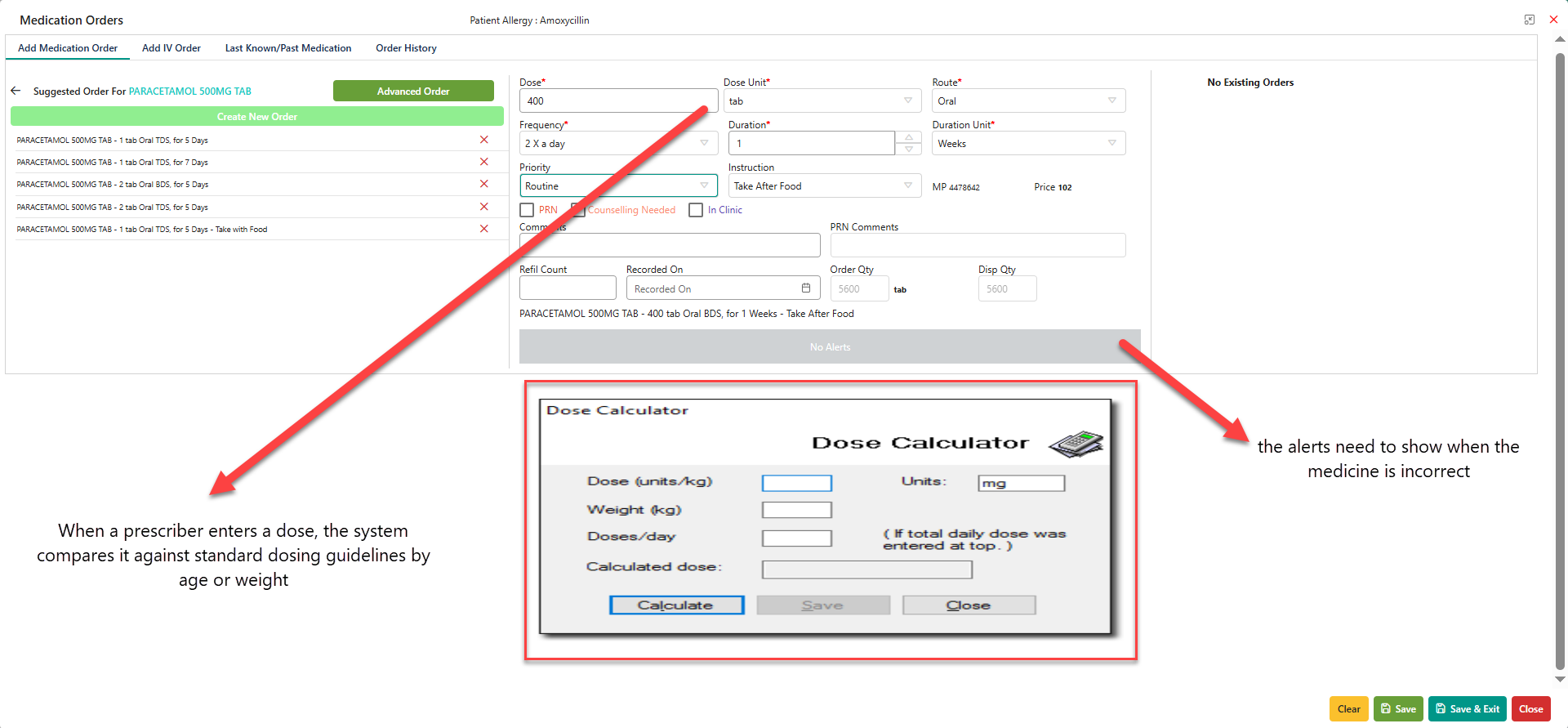
Files
Updated by Kamini Kumar 9 months ago
- Target version set to HUMS Release Ver 4
- Issue released on Dev added
Updated by Daniyal Ansari 9 months ago
- Assignee changed from Daniyal Ansari to Rasoul Nayeb
Hi @Rasoul, i believe this point would be part of the MIMS integration you have been working on. If any UI help or support needed for this point, please let me know, thank you.
Updated by Kierthini Nethi 8 months ago
- Priority changed from Normal to Medium
- Issue released on NA added
- Issue released on deleted (
Dev) - Function HUMS added
Updated by Nur'Ain Binti Karim 7 months ago
- Priority changed from Medium to Critical
Updated by Mehdi Mehdi 6 months ago
- Assignee changed from Rasoul Nayeb to Zaldy Conrad Tungcap
Updated by Mehdi Mehdi 6 months ago
- Assignee changed from Zaldy Conrad Tungcap to Kierthini Nethi
Updated by Kierthini Nethi 6 months ago
- Subject changed from GAPS > PHIS > If prescription dose is wrong, to alert the prescriber. to GAPS > PHIS > Dose Calculator.
Updated by Kierthini Nethi 6 months ago
- Subject changed from GAPS > PHIS > Dose Calculator. to GAPS > Clinical Pharmacy > Dose Calculator.
Updated by Kierthini Nethi 6 months ago
- Assignee changed from Kierthini Nethi to Mehdi Mehdi
Objective
To develop a standalone dosage calculator integrated within the clinical system to assist doctors in calculating adult and paediatric medication dosing based on patient parameters and manually entered dosing references.
This phase will not require full MIMS integration for automated dosage recommendations. The calculator should first support manual dose entry while utilizing available patient clinical data from the system.
Scope (Phase 1)The calculator shall:
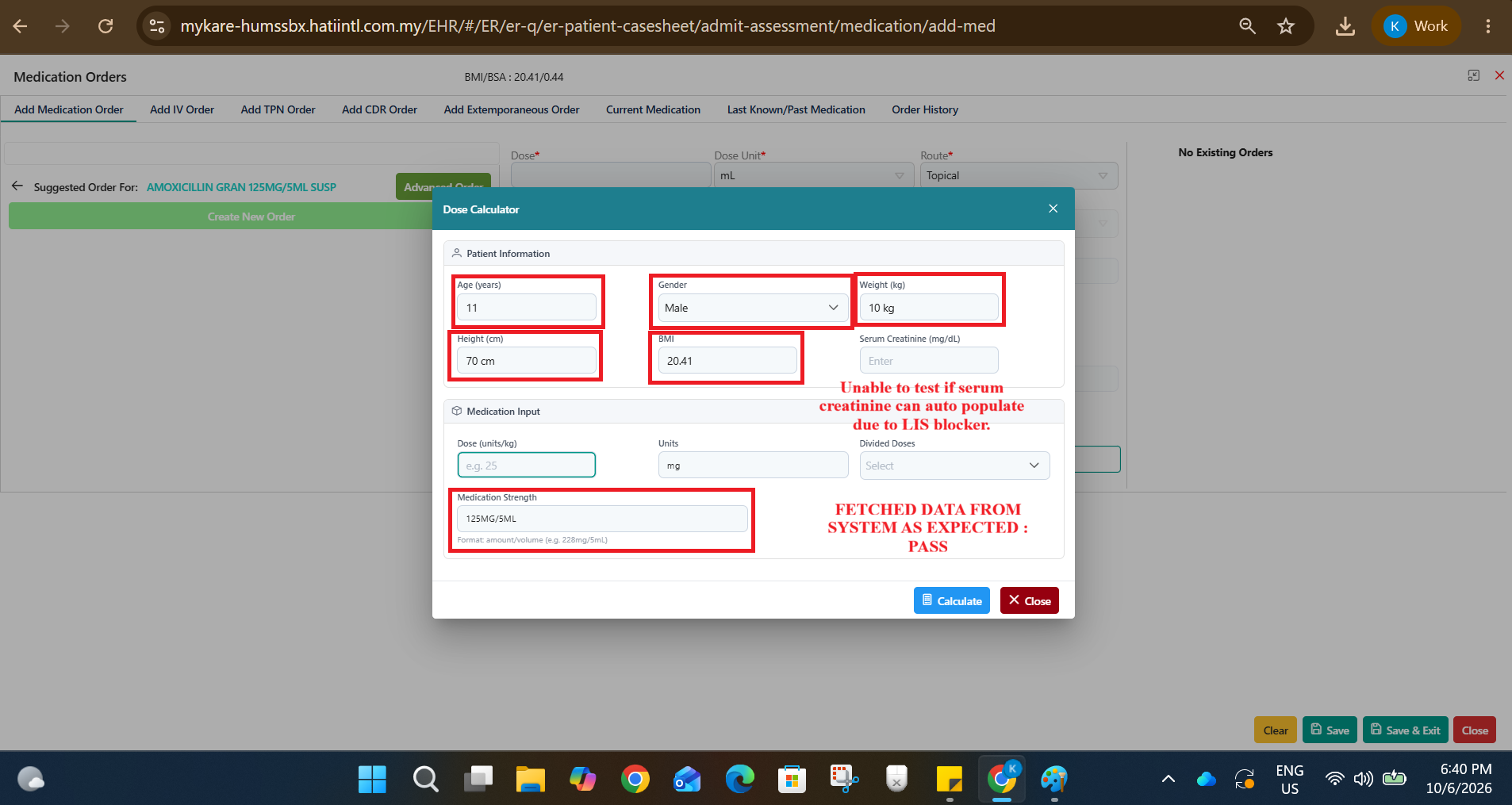
- Fetch patient demographic and clinical parameters automatically from existing modules
- Allow users to manually enter medication dosing references
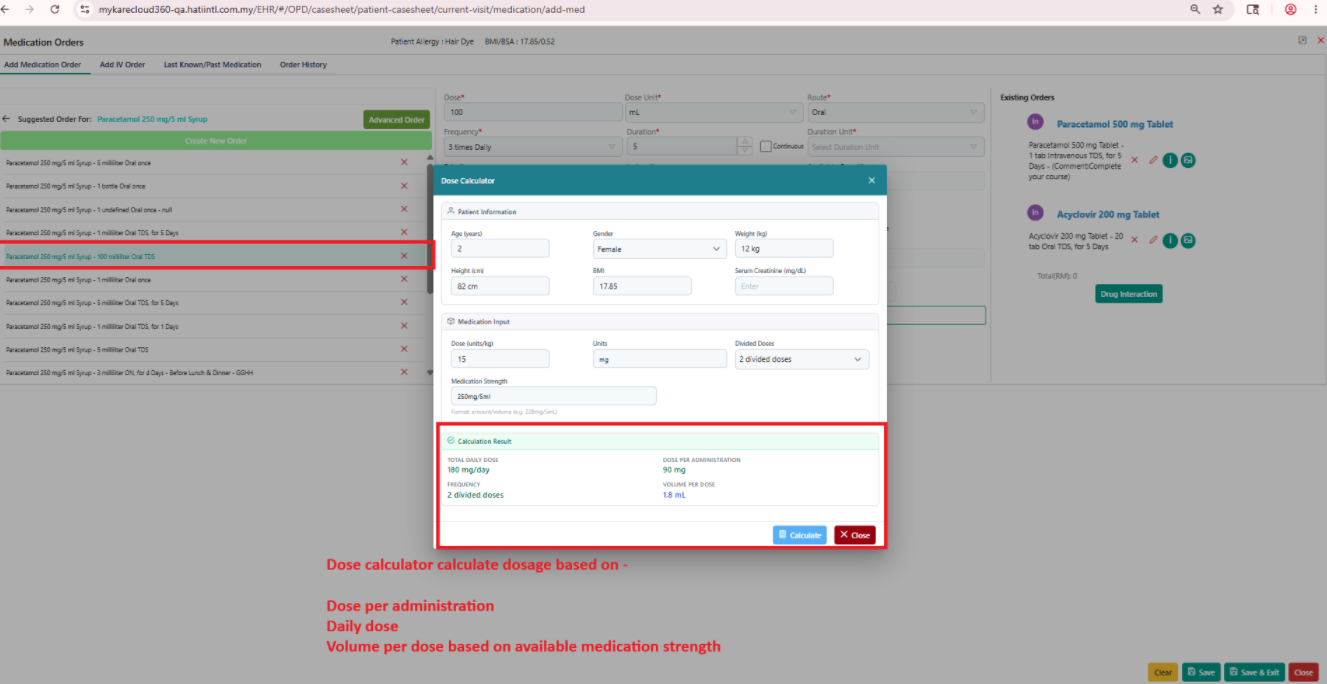
- Dose per administration
- Daily dose
- Volume per dose based on available medication strength
- Support both adult and paediatric calculations
- Support renal function-based calculations using existing creatinine clearance/eGFR formulas
Data Fetching Requirements
Parameter : Source
Age : Clinical / Medcare Demographic
Gender : Clinical Data
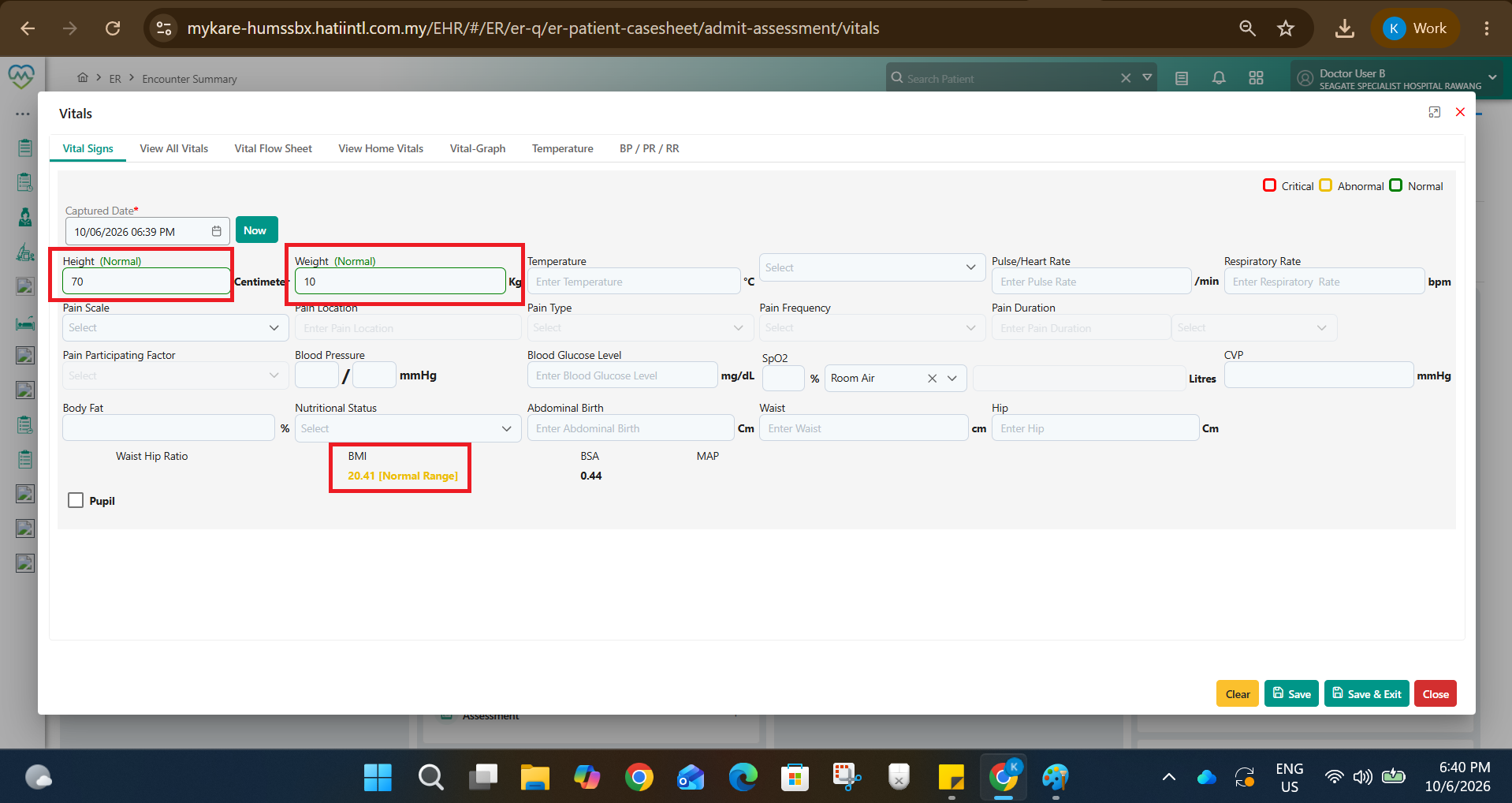
Weight (kg) : Vitals
Height (cm) : Vitals
BMI : _ * Vitals*
Serum Creatinine : _Clinical Lab Results (if available)/ manual
eGFR / Creatinine Clearance : Existing formula from SOAP Notes > Objective > Clinical Calculator
Functional Requirements
1. Patient Information Section
System shall auto-populate:
- Age
- Gender
- Weight
- Height
- BMI
- Serum Creatinine (if available)
- eGFR / Creatinine Clearance
If no values are available: User may manually enter values.
2. Medication Input Section
Phase 1 (Without Full MIMS Integration)
User shall manually enter:
Desired Dose : Free Text
Frequency : Free text
Available Medication Strength : Free Text Numeric
3. Dosage Calculation Logic
System shall support:
A. Weight-Based Dosing (mg/kg)
Formula:
Required dose = Selected dose (mg/kg) × Weight (kg)
If divided doses:
Dose per administration = Total daily dose / Number of doses per day
4. Medication Strength Conversion
System shall calculate volume required based on available medication strength.
Example:
Medication strength = 228mg/5mL
1mL = 45.6mg
Required dose = 125mg
Volume required:
125 / 45.6 = 2.74mL
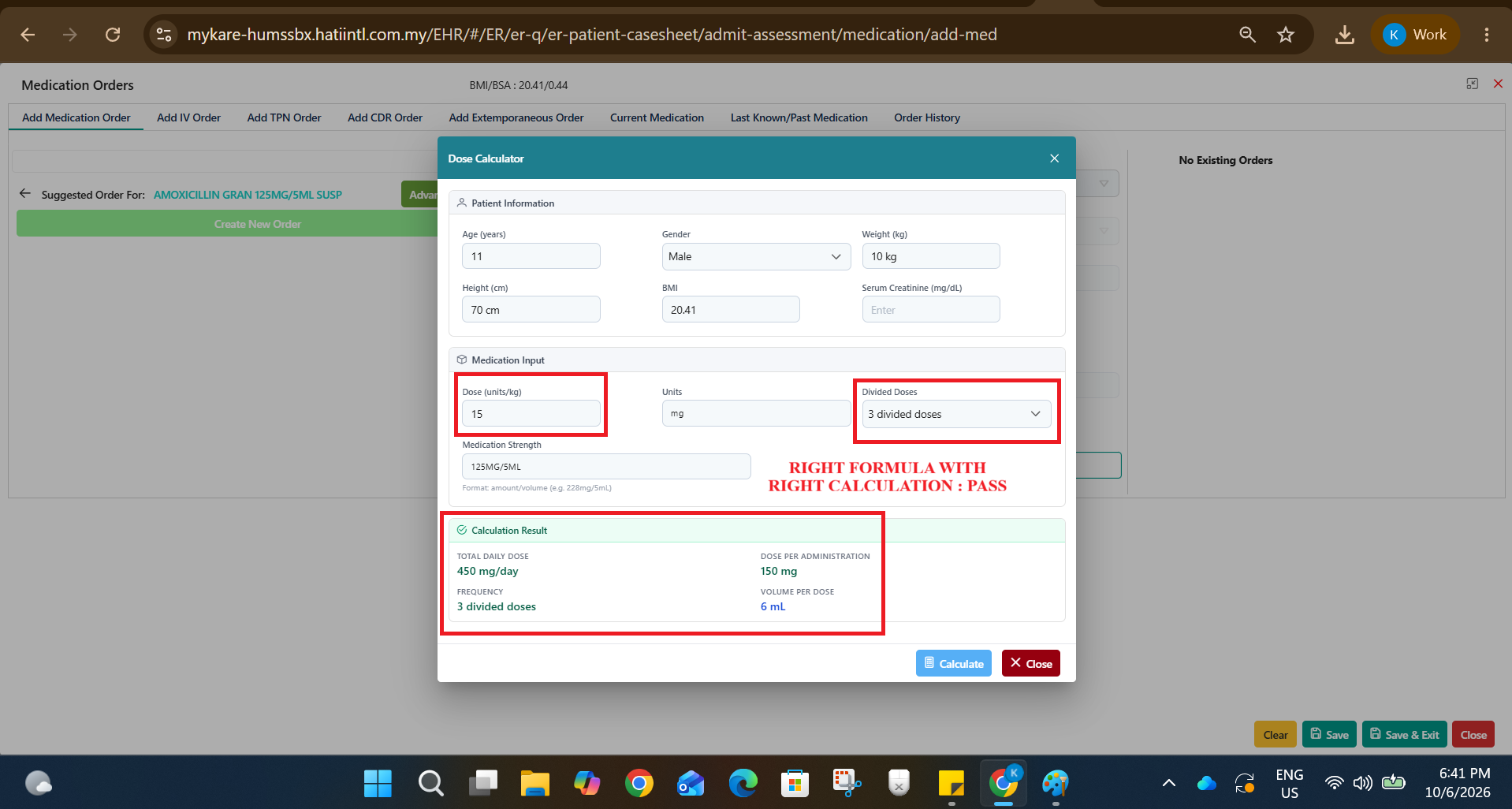
5. Calculation Output
System shall display Output :
Total Daily Dose
Dose Per Administration
Frequency
Renal Function (if applicable)
6. Example Workflow
Example: Syrup Augmentin
Input:
Weight = 10kg
Dosing reference = 15–25mg/kg/day in 2 divided doses
User selected dose = 25mg/kg/day
Frequency = BD (twice daily)
Medication strength = 228mg/5mL
Calculation:
25 × 10 = 250mg/day
250 / 2 = 125mg per dose
228mg / 5mL = 45.6mg/mL
125 / 45.6 = 2.74mL per dose
Output:
125mg BD
2.74mL per dose
The following fields/functions will later be integrated with MIMS:
- Drug Name (Generic + Brand)
- Standard Adult Dose
- Paediatric Dose References
- Maximum Dose Limits
- Drug Contraindications
- Renal Dose Adjustment
- Drug Interaction Alerts
Calculator UI should:
- Be accessible within prescribing workflow
- Allow quick manual dose entry
- Auto-fetch patient clinical data
- Display calculations instantly upon input
- Allow users to override manually entered dose selections
- The calculator is intended as a clinical support tool only.
- Final prescribing responsibility remains with the clinician.
- System should not auto-prescribe medications.
- No hard stop validation required in Phase 1.
- Maximum dose checking will only be available after MIMS integration.
Updated by Kierthini Nethi 6 months ago
Objective
To develop a standalone dosage calculator integrated within the clinical system to assist doctors in calculating adult and paediatric medication dosing based on patient parameters and manually entered dosing references.
This phase will not require full MIMS integration for automated dosage recommendations. The calculator should first support manual dose entry while utilizing available patient clinical data from the system.
Scope (Phase 1)The calculator shall:
- Fetch patient demographic and clinical parameters automatically from existing modules
- Allow users to manually enter medication dosing references
- Dose per administration
- Daily dose
- Volume per dose based on available medication strength
- Support both adult and paediatric calculations
- Support renal function-based calculations using existing creatinine clearance/eGFR formulas
Data Fetching Requirements
Parameter : Source
Age : Clinical / Medcare Demographic
Gender : Clinical Data
Weight (kg) : Vitals
Height (cm) : Vitals
BMI : _ * Vitals*
Serum Creatinine : _Clinical Lab Results (if available)/ manual
Creatinine Clearance : EXPLANATION WITH FORMULA IS WRITTEN MOST
Functional Requirements
1. Patient Information Section
System shall auto-populate:
- Age
- Gender
- Weight
- Height
- BMI
- Serum Creatinine (if available)
- eGFR / Creatinine Clearance
If no values are available: User may manually enter values.
2. Medication Input Section
Phase 1 (Without Full MIMS Integration)
User shall manually enter:
Desired Dose : Free Text
Frequency : Free text
Available Medication Strength : Free Text Numeric
3. Dosage Calculation Logic
System shall support:
A. Weight-Based Dosing (mg/kg)
Formula:
Required dose = Selected dose (mg/kg) × Weight (kg)
If divided doses:
Dose per administration = Total daily dose / Number of doses per day
4. Medication Strength Conversion
System shall calculate volume required based on available medication strength.
Example:
Medication strength = 228mg/5mL
1mL = 45.6mg
Required dose = 125mg
Volume required:
125 / 45.6 = 2.74mL
5. Calculation Output
System shall display Output :
Total Daily Dose
Dose Per Administration
Frequency
Renal Function (if applicable)
6. Example Workflow
Example: Syrup Augmentin
Input:
Weight = 10kg
Dosing reference = 15–25mg/kg/day in 2 divided doses
User selected dose = 25mg/kg/day
Frequency = BD (twice daily)
Medication strength = 228mg/5mL
Calculation:
25 × 10 = 250mg/day
250 / 2 = 125mg per dose
228mg / 5mL = 45.6mg/mL
125 / 45.6 = 2.74mL per dose
Output:
125mg BD
2.74mL per dose
The following fields/functions will later be integrated with MIMS:
- Drug Name (Generic + Brand)
- Standard Adult Dose
- Paediatric Dose References
- Maximum Dose Limits
- Drug Contraindications
- Renal Dose Adjustment
- Drug Interaction Alerts
Calculator UI should:
- Be accessible within prescribing workflow
- Allow quick manual dose entry
- Auto-fetch patient clinical data
- Display calculations instantly upon input
- Allow users to override manually entered dose selections
- The calculator is intended as a clinical support tool only.
- Final prescribing responsibility remains with the clinician.
- System should not auto-prescribe medications.
- No hard stop validation required in Phase 1.
- Maximum dose checking will only be available after MIMS integration.
The Cockcroft-Gault (CG) equation estimates creatinine clearance (CrCl) in mL/min, factoring in age, weight, serum creatinine, and gender. It is primarily used for drug dosing adjustments rather than staging chronic kidney disease.
The formula is:
(CrCl) = (140 - age) X {Weight (kg)} / 72 X {Serum Cr (mg/dL)} X (0.85 if female).
Key Considerations for the Formula:
Units: Age (years), Weight (kg), Serum Creatinine (mg/dL).
Female Adjustment: Multiply the final result by (0.85).
Weight Metric: While often using total body weight, studies suggest using ideal body weight (IBW) or adjusted body weight in obese patients to avoid overestimation.
Limitations: It assumes stable renal function and may be inaccurate in patients with extreme body mass index (BMI) or rapid changes in kidney function.
Commonly Used Formulas for Ideal Body Weight (IBW) (Devine formula):
Males: 50 kg + 0.91 x (Height in cm - 152.4)
Females: 45.5 kg + 0.91 x (Height in cm - 152.4)
Updated by Mehdi Mehdi 6 months ago
- Assignee changed from Mehdi Mehdi to Ahmad Ashfaq
@Ahmad Ashfaq
please take a look at it
For basic functionality you don't need any integration/master mapping, just simple calculator functionality
Updated by Mehdi Mehdi 6 months ago
- Dev Due date set to 19/05/2026
- Release date to QA set to 19/05/2026
Updated by Ahmad Ashfaq 6 months ago
- Status changed from Assigned to Coded
- % Done changed from 0 to 100
- Issue released on Dev added
- Issue released on deleted (
NA)
Updated by Mehdi Mehdi 6 months ago
- Assignee changed from Ahmad Ashfaq to Mangesh Pangrekar
Updated by Harshada Dixit 6 months ago
Based on:-
Scope (Phase 1)
Fetch patient demographic and clinical parameters automatically from existing modules- PASS
Allow users to manually enter medication dosing references- PASS
Dose per administration
Daily dose
Volume per dose based on available medication strength
Support both adult and pediatric calculations
Above all functions working in Dose calculation
Tested in QA
Updated by Mangesh Pangrekar 5 months ago
- Assignee changed from Mangesh Pangrekar to Kierthini Nethi
Updated by Mangesh Pangrekar 5 months ago
- Issue released on HUMS SandBox added
- Issue released on deleted (
Dev)
Updated by Kierthini Nethi 5 months ago
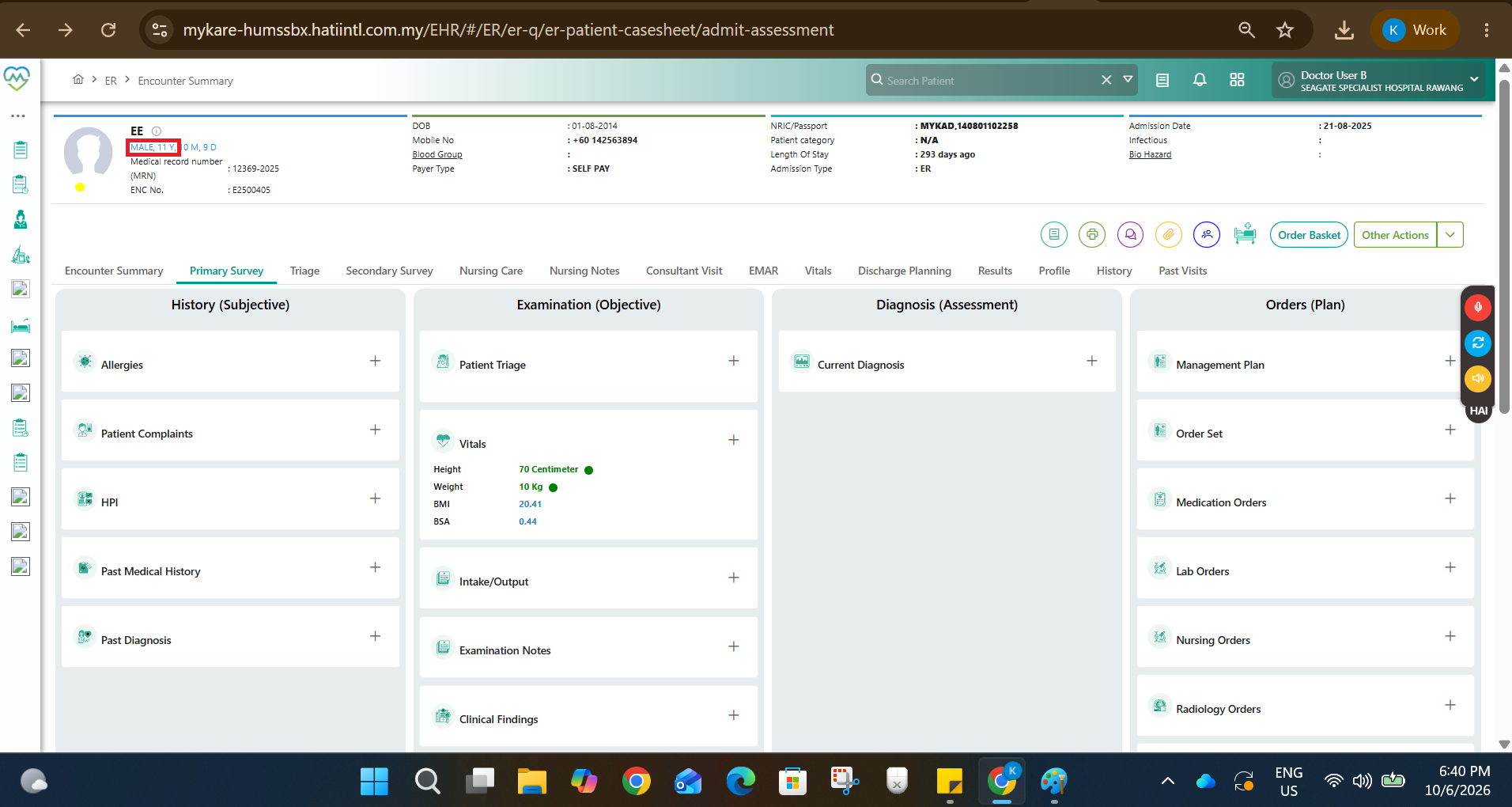
- File clipboard-202606101847-av3bl.png clipboard-202606101847-av3bl.png added
- File clipboard-202606101847-h8hhn.png clipboard-202606101847-h8hhn.png added
- File clipboard-202606101848-tpxla.png clipboard-202606101848-tpxla.png added
- File clipboard-202606101848-kzejb.png clipboard-202606101848-kzejb.png added
- Status changed from Tested to Closed
WORKING AS EXPECTED ON HUMS SANDBOX.