Gaps #87139
closedSerology: To include an option to mark the Serology report as "Confidential".
Description
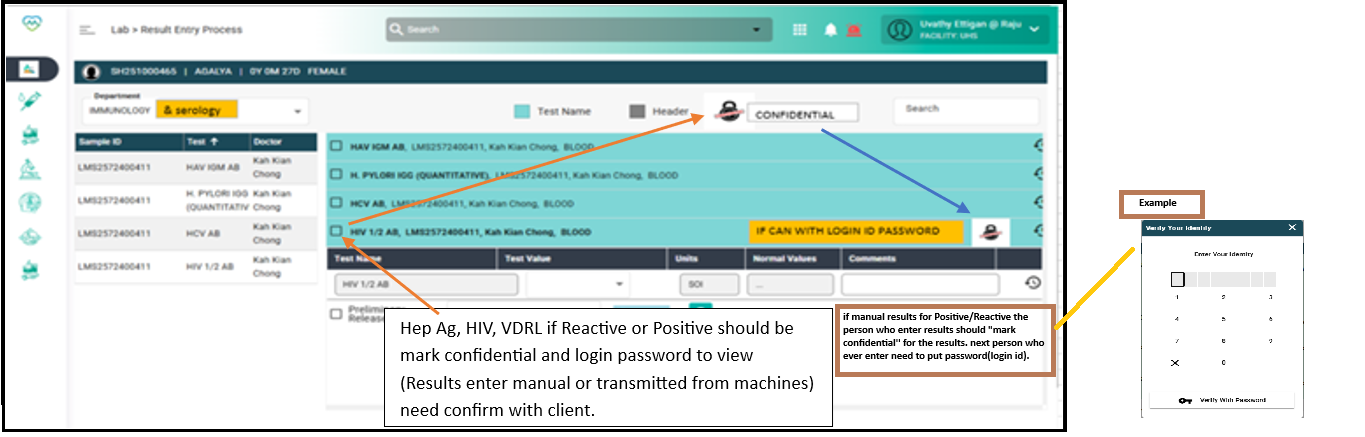
Provision to mark specific reports as Confidential at the time of result validation or approval and with a visible indicator/icon on report dashboards and printouts to alert user.
Details required:
To clarify/confirm with client on UI placement
- to dicscuss with client on what is next; eg the clinicare flow and medcare flow
- Suggestion eg: chceck box placement in Lab
: Clinicians/ MLTs required access to check the report
Hep Ag, HIV, VDRL if Reactive or Positive should be marked confidential and require login password to view. Once enter the results or transmitted as a positive results or reactive results for HIV,VDRL and Hbs Ag the system should treat as confidential results.
Files
Updated by Sunil Shinde over 1 year ago
- Category changed from MedCare to M Laboratory
Updated by Thivakaran Maniam about 1 year ago
- File clipboard-202508111042-lfbm2.png added
- Description updated (diff)
Updated by Thivakaran Maniam about 1 year ago
- File clipboard-202508251112-ruaro.png added
- Description updated (diff)
Updated by Thivakaran Maniam about 1 year ago
- File deleted (
clipboard-202508111042-lfbm2.png)
Updated by Thivakaran Maniam about 1 year ago
- File deleted (
clipboard-202508251112-ruaro.png)
Updated by Thivakaran Maniam about 1 year ago
- File clipboard-202508271611-egwjf.png clipboard-202508271611-egwjf.png added
- Description updated (diff)
Updated by Sunil Shinde about 1 year ago
- Assignee changed from Vasuki Muniratnam to Snehal Bhosale
Updated by Snehal Bhosale about 1 year ago
- Assignee changed from Snehal Bhosale to Rupali Suryawanshi
Updated by Rupali Suryawanshi about 1 year ago
- Status changed from New to Assigned
Updated by Rupali Suryawanshi about 1 year ago
- Status changed from Assigned to Coded
Updated by Shital pravin about 1 year ago
- Assignee changed from Rupali Suryawanshi to Mangesh Pangrekar
Updated by sugi vithyashini about 1 year ago · Edited
- File confidentialtest.PNG confidentialtest.PNG added
- Status changed from QA to Re-open
- Assignee changed from Mangesh Pangrekar to Vasuki Muniratnam
1. The confidential should show if user enter result as positive then user need to add password to view result
2. Currently all parameter which have positive and negative is showing as confidential - FAIL
Required confidential test only as listed below:
Hep Ag, HIV, VDRL
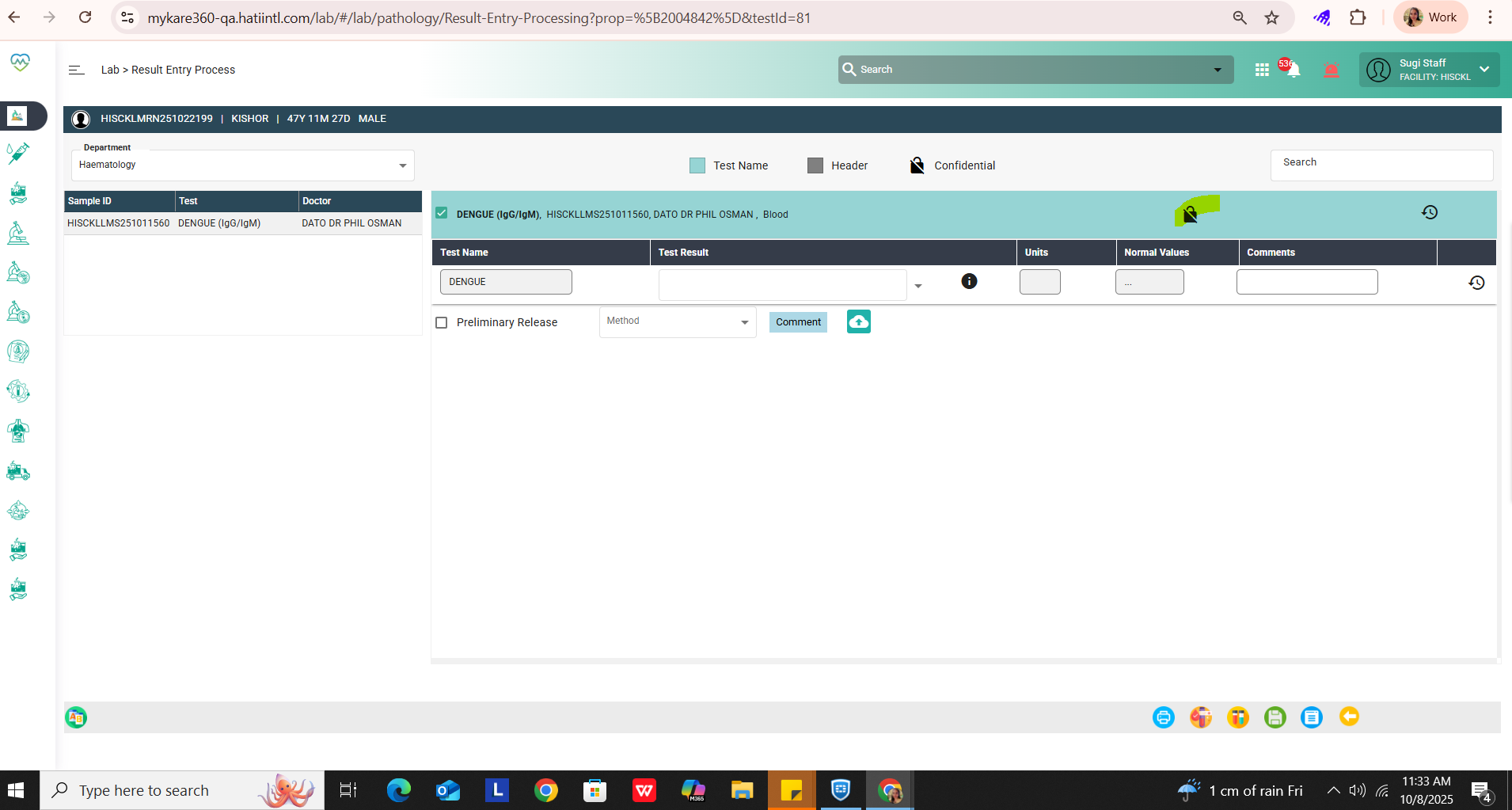
Only tests marked as “Confidential” should have the functionality that requires a password to verify or approve the report when the results are positive.
Updated by Vasuki Muniratnam about 1 year ago
- Assignee changed from Vasuki Muniratnam to Prashant Isapure
Updated by Mohsin Ali about 1 year ago
- Assignee changed from Prashant Isapure to Rupali Suryawanshi
Updated by sugi vithyashini about 1 year ago
- File bandicam 2025-10-08 17-33-16-115.mp4 bandicam 2025-10-08 17-33-16-115.mp4 added
- Status changed from Re-open to Tested
- Assignee changed from Rupali Suryawanshi to Sunil Shinde
As discussed with sunil, user is allowed to mark confidential manually if test is positive and need to add password to view report in result entry
video attached
Updated by Kierthini Nethi 8 months ago
- Priority changed from Normal to Critical
- Issue released on Prod added
- Function HUMS added
Updated by Kierthini Nethi 8 months ago
- Assignee changed from Sunil Shinde to Zaldy Conrad Tungcap
Updated by Vasuki Muniratnam 7 months ago
- File CONFIDENTIAL REPORT.mp4 CONFIDENTIAL REPORT.mp4 added
- Status changed from Tested to Re-open
- Assignee changed from Zaldy Conrad Tungcap to Kunal Yelne
Tested in QA again its not working as expected. Video attached for reference.
Updated by Kunal Yelne 7 months ago
- Assignee changed from Kunal Yelne to Rupali Suryawanshi
Updated by Rupali Suryawanshi 7 months ago
- File clipboard-202604231330-k3q9p.png clipboard-202604231330-k3q9p.png added
- File clipboard-202604231331-dpzux.png clipboard-202604231331-dpzux.png added
- File bandicam 2026-04-23 13-57-53-197.mp4 bandicam 2026-04-23 13-57-53-197.mp4 added
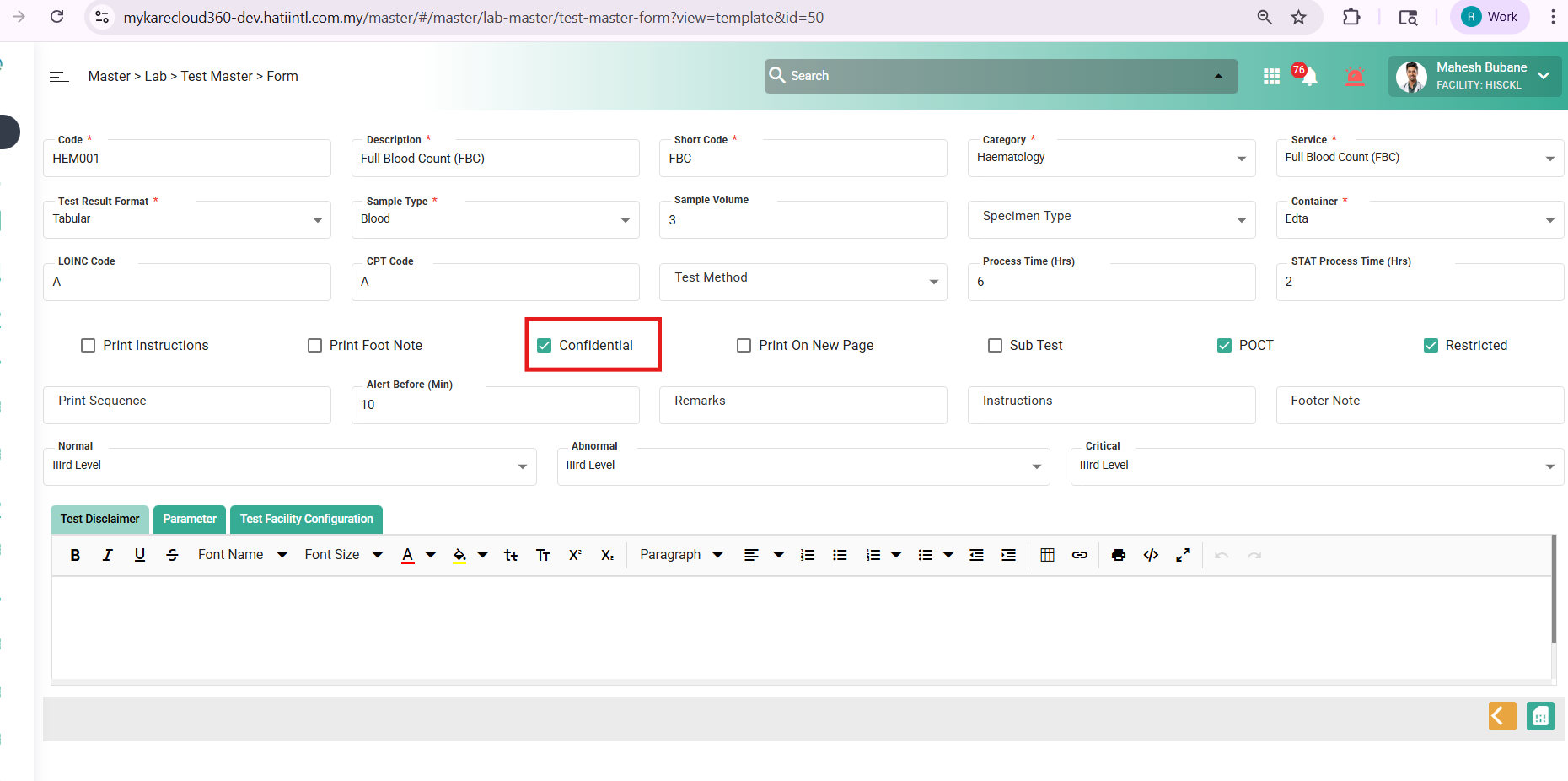
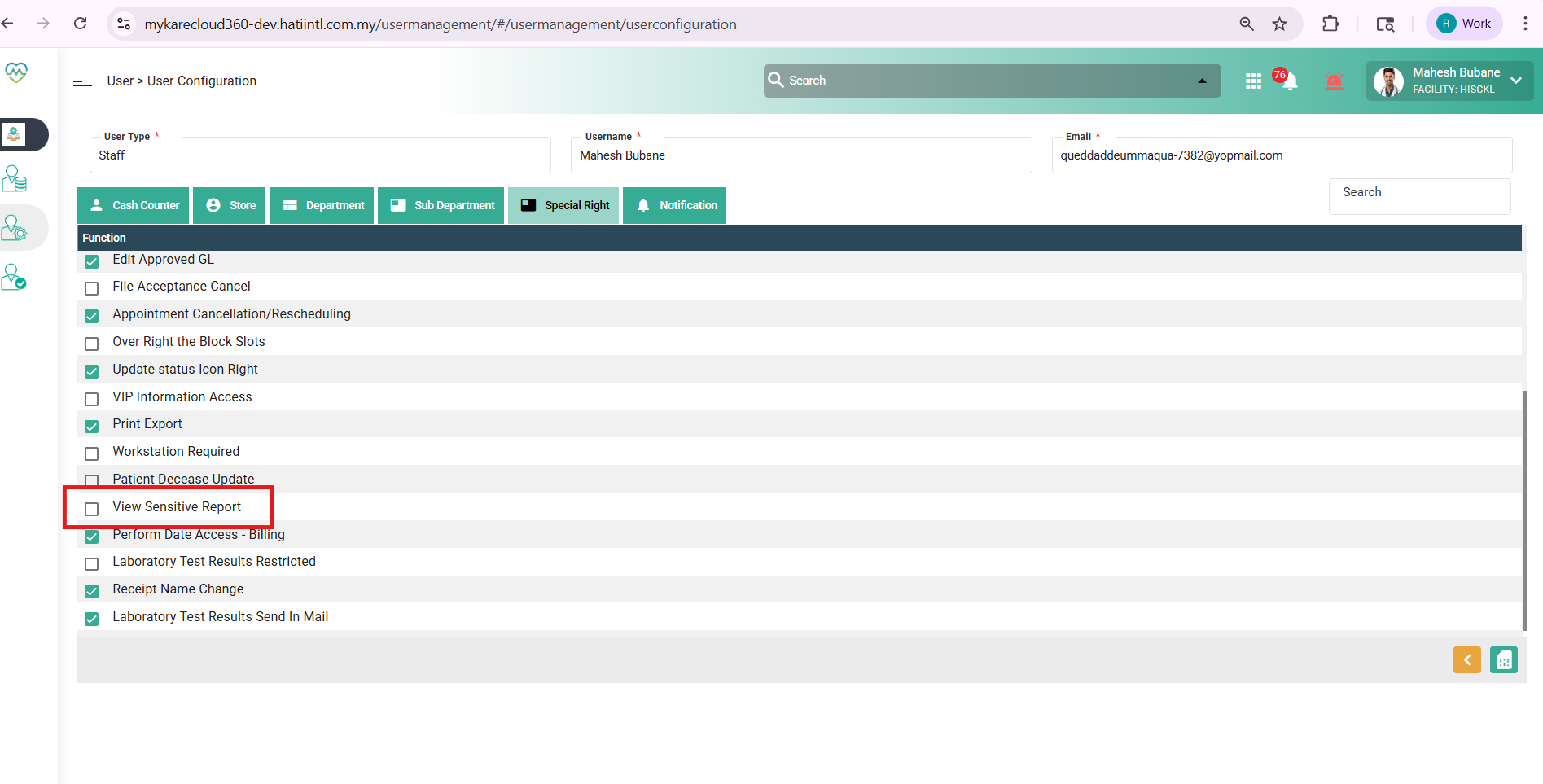
If confidential flag is true and user don't have view sensitive print access
then showing message to print and view the test
Updated by Rupali Suryawanshi 7 months ago
user have view sensitive print access
and test is confidential the on print button open dialog for login credentials if match then print report if not then shows message..and view the test
Updated by Rupali Suryawanshi 7 months ago
- Status changed from Re-open to Coded
Updated by Daniyal Ansari 6 months ago
- Status changed from Coded to QA
- Assignee changed from Rupali Suryawanshi to Mangesh Pangrekar
- Release date to QA set to 06/05/2026
- Issue released on Dev, QA added
- Issue released on deleted (
Prod)
Updated by Yaswanth Sai Thirumalasetty 6 months ago
- File clipboard-202605111205-p2mwh.png clipboard-202605111205-p2mwh.png added
- Status changed from QA to Re-open
- Assignee changed from Mangesh Pangrekar to Daniyal Ansari
Tested in humssbx, There is no Option of View Sensitive Report.
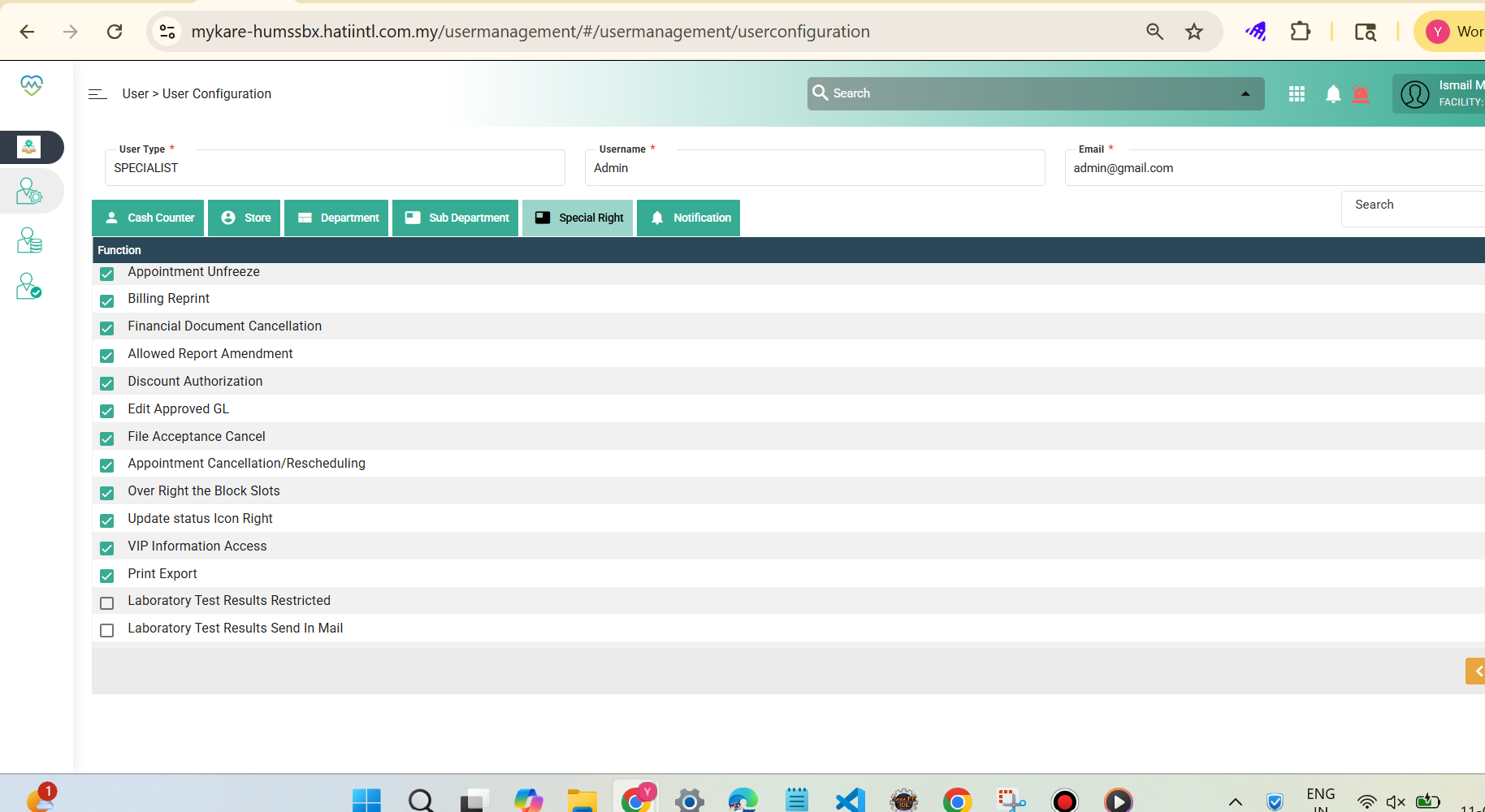
Updated by Daniyal Ansari 6 months ago
- Assignee changed from Daniyal Ansari to Kunal Yelne
Updated by Kunal Yelne 6 months ago
- File clipboard-202605131547-ksdqf.png clipboard-202605131547-ksdqf.png added
- Status changed from Re-open to Coded
Please check now Data added
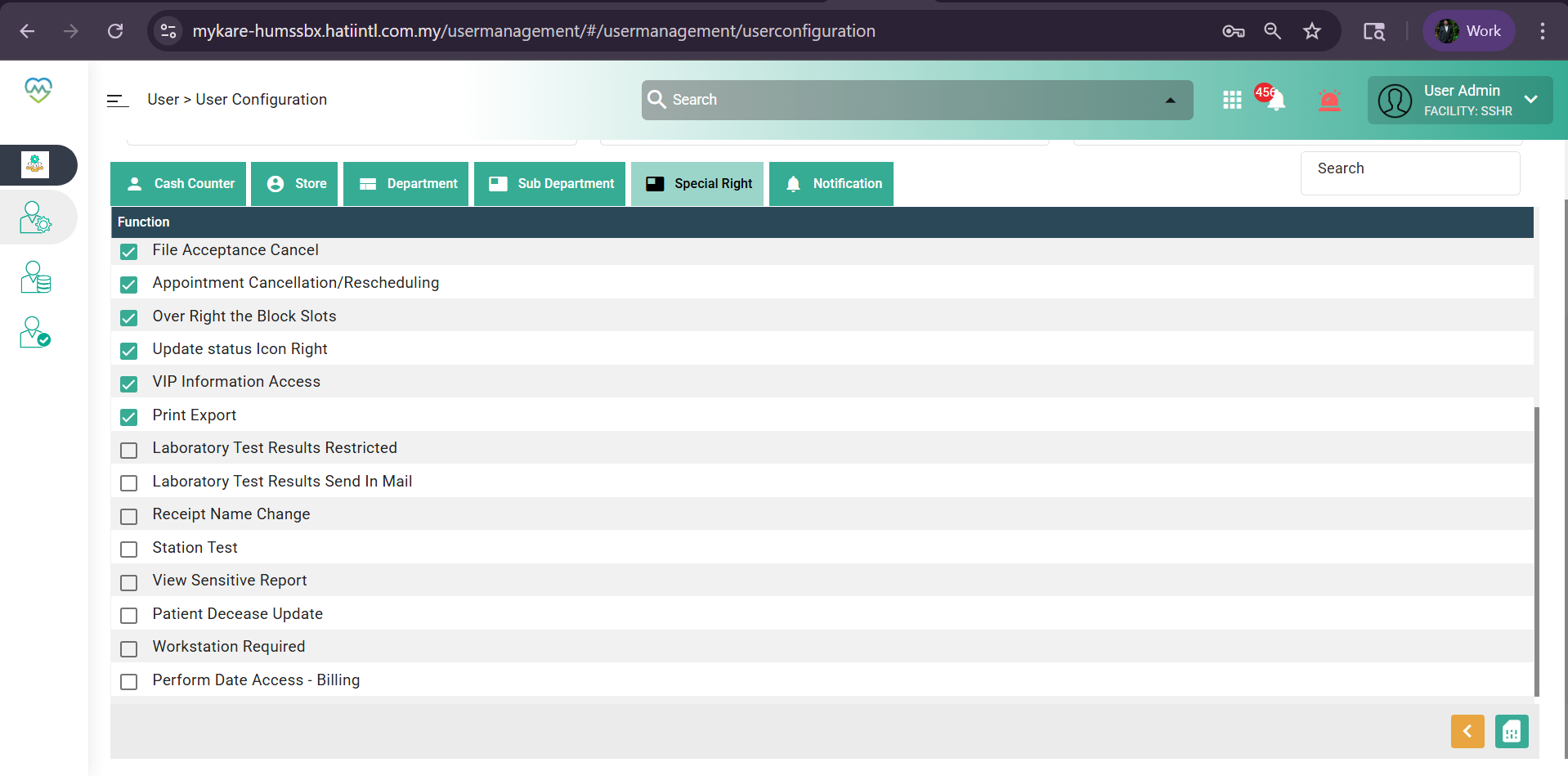
Updated by Daniyal Ansari 6 months ago
- Status changed from Coded to QA
- Assignee changed from Kunal Yelne to Mangesh Pangrekar
Updated by Yaswanth Sai Thirumalasetty 6 months ago
- File clipboard-202605151442-o3x2m.png clipboard-202605151442-o3x2m.png added
- File clipboard-202605151442-clmo6.png clipboard-202605151442-clmo6.png added
- Status changed from QA to Tested
Tested in QA, Working Fine
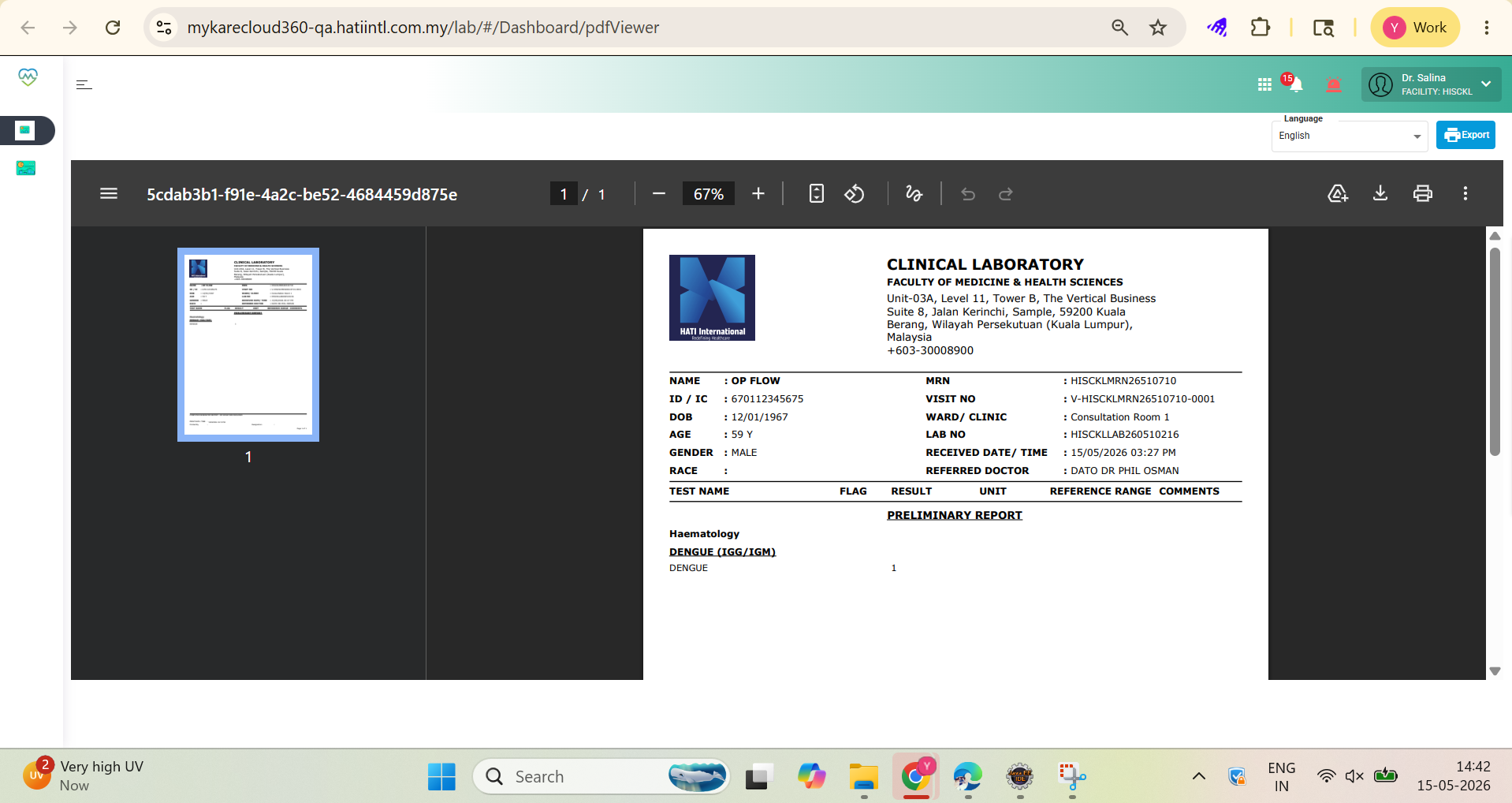
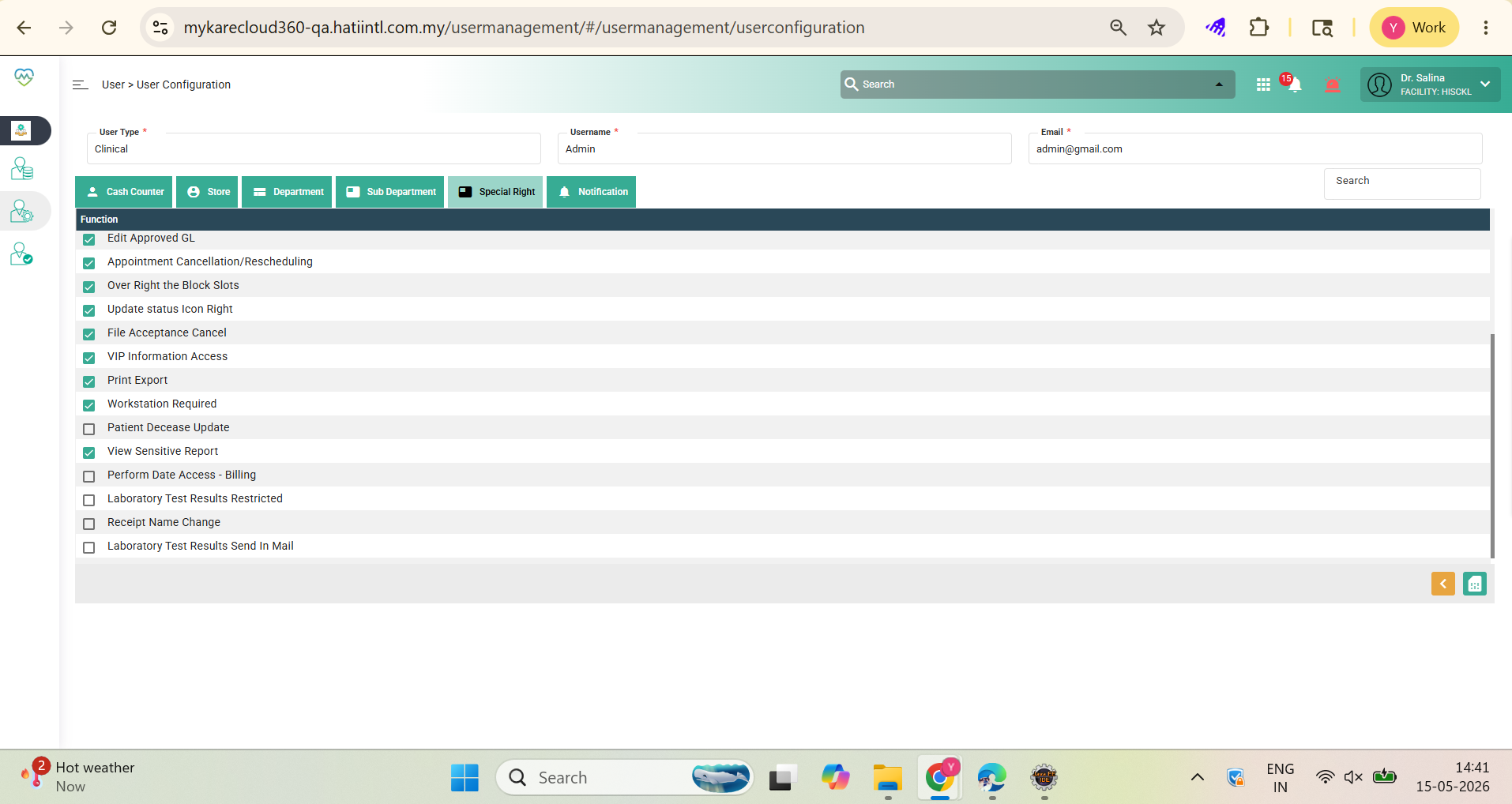
Updated by Mangesh Pangrekar 6 months ago
- Assignee changed from Mangesh Pangrekar to Kierthini Nethi
Updated by Kierthini Nethi 6 months ago
- Assignee changed from Kierthini Nethi to Vasuki Muniratnam
Updated by Nurfarisha Izani 5 months ago
- File clipboard-202606261042-3grg2.png clipboard-202606261042-3grg2.png added
- File clipboard-202606261044-q1jbq.png clipboard-202606261044-q1jbq.png added
- File (GAPS)Add Confidential Flag for Serology Reports.pdf (GAPS)Add Confidential Flag for Serology Reports.pdf added
- Status changed from Tested to Closed
- Issue released on UAT added
- Issue released on deleted (
Dev, QA)
Update Below VVVVVVVVVVVVVVVVVVVVVVVVVVVVVVVVVVVVVVVVVVVVVVVVVVVVVVVVVVVVVVVVVV
Environment/Link: https://mykare-selgate-sit.hatiintl.com.my
Module/Path: Lab > Reports
Description: GAPS: Add Confidential Flag for Serology Reports
Pre-condition
1. User A is a LAB staff with the access right to view confidential reports.
2. User B is a LAB staff without the access right to view confidential reports.
Step To Reproduce
1. Register a patient and order a serology test (e.g., Hepatitis B / HIV / Dengue Serology).
2. Go to the Sample Taking screen, select the test request, click tick, and click Save.
3. Go to the Central Receiving screen, select the test, and click Save.
4. Navigate to Sample/Result Management > Sample Processing, select the test, and click tick to receive the sample.
5. Navigate to Sample/Result Management > Result Entry, select the test, and click the link in the sample details column.
6. Select the tick checkbox at the test level and click the test name to enter the result.
7. Click the keypad icon to mark the test as confidential, enter the result, and click Submit.
8. Navigate to Sample/Result Management > Result Validation, select the patient, and click the link in the sample details column.
9. Verify the result details, click Submit, and repeat the same verification step in the Result Approval screen (if applicable based on master setup).
10. Log in as User A (with confidential report access), navigate to the Reports menu, select the patient, click the blue print button, and enter the passcode.
11. Log in as User B (without confidential report access), navigate to the Reports menu, select the patient, and click the blue print button.
Step 10: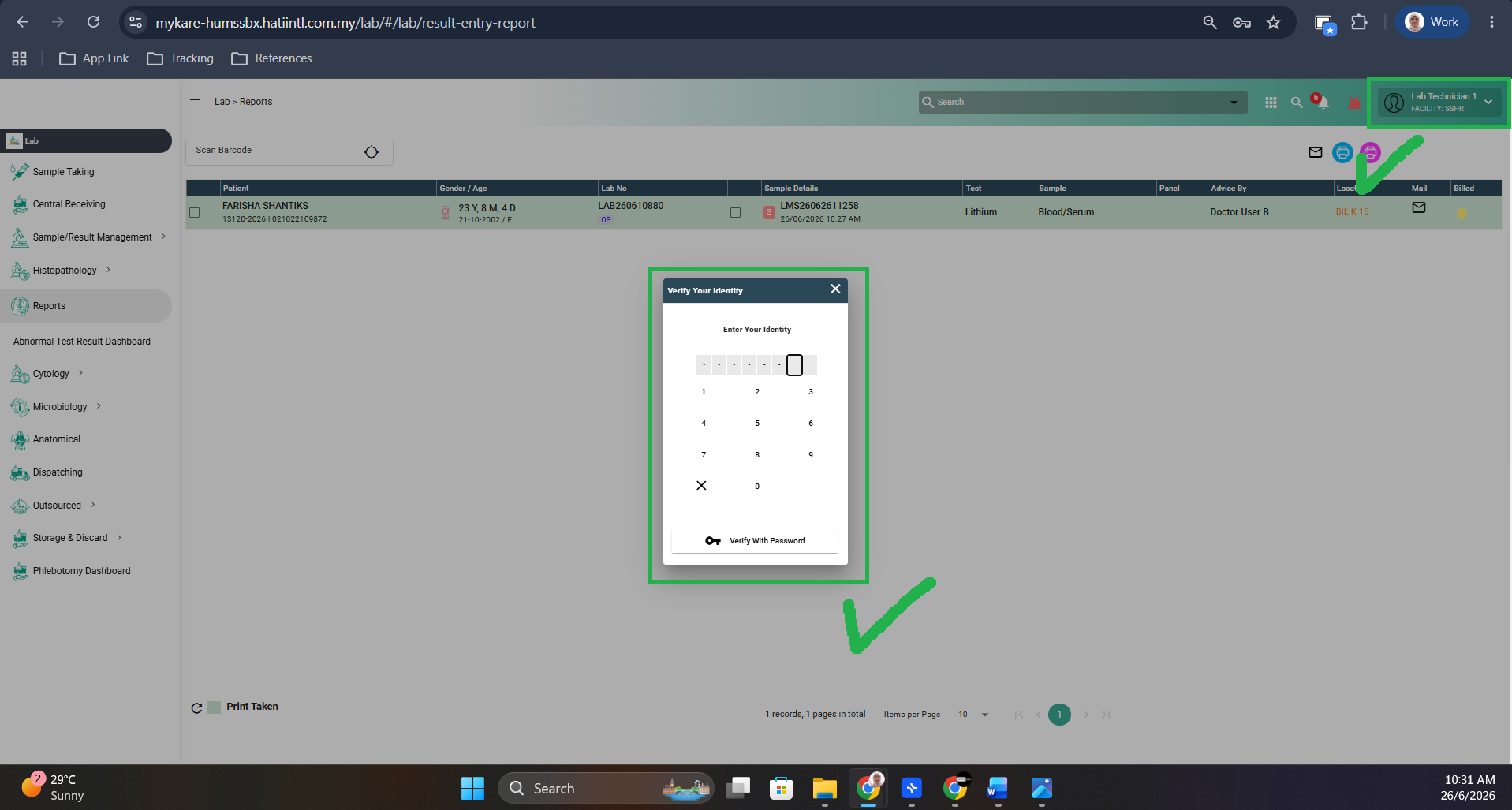
Step 11: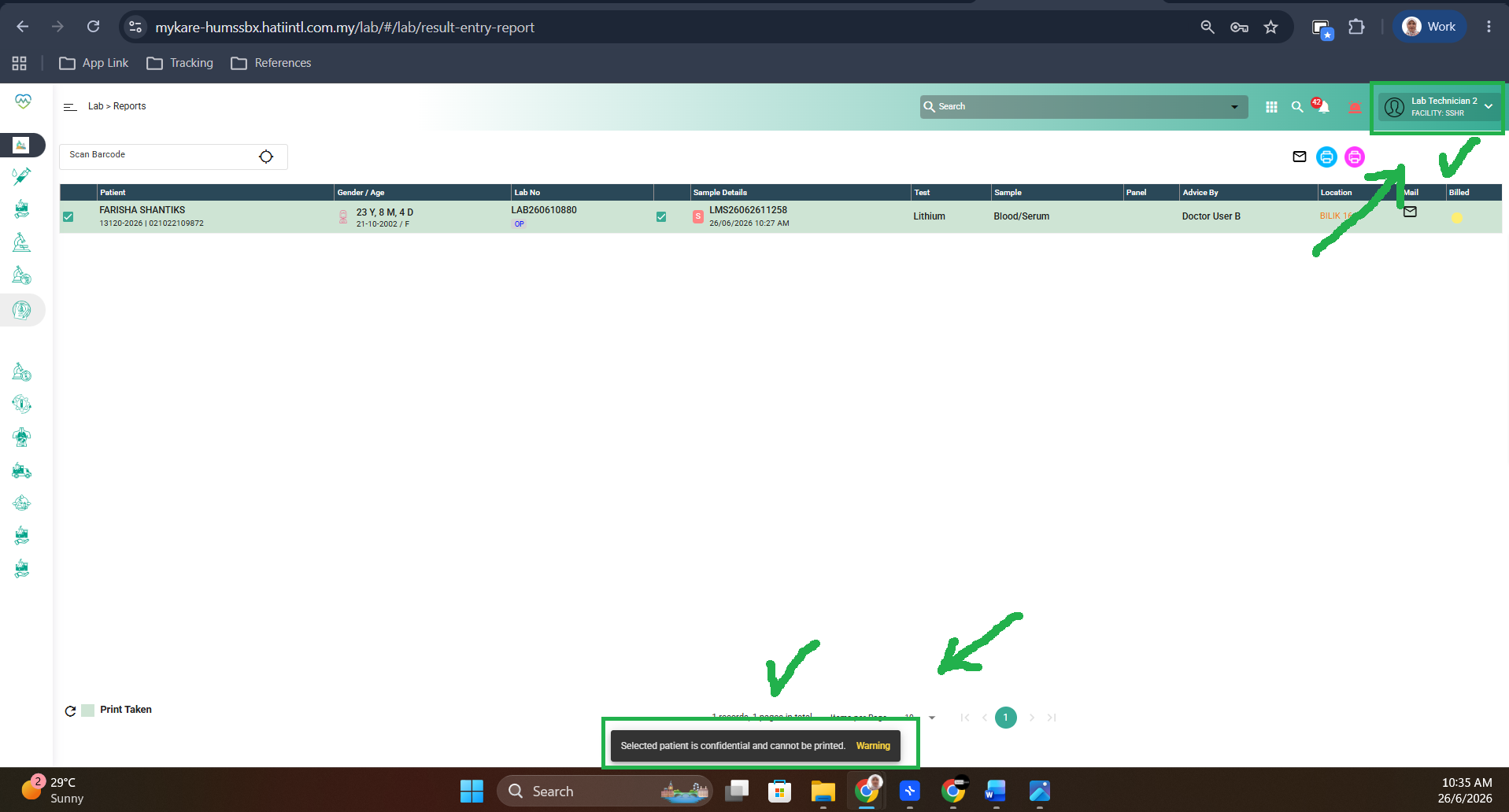
Result: Pass