Gaps #92598
openUnified Rejected Orders Tracking in Patient Summary Across All Clinical Modules
0%
Description
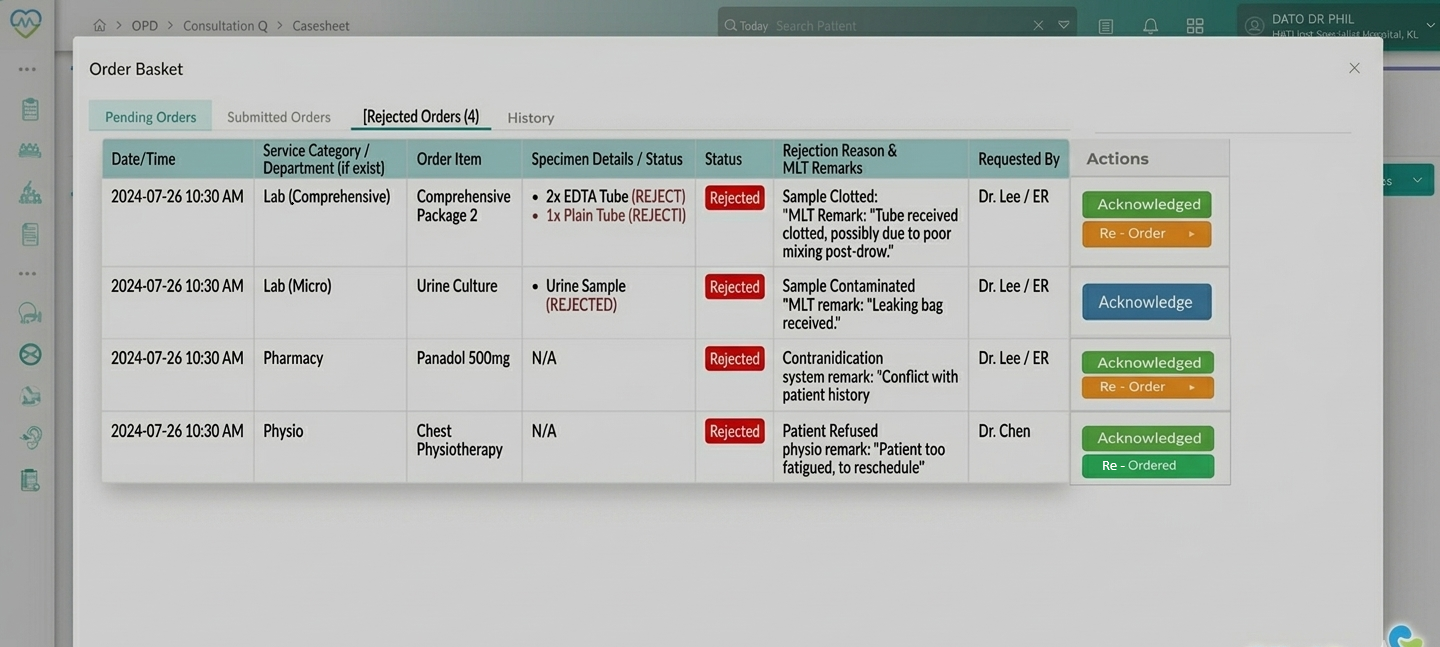
Description: Currently, rejected orders (particularly laboratory specimens) are difficult to track across different disciplines. This wireframe introduces a Rejected Orders Tab within the Order Basket of the Patient Summary. This tab will unify rejections from Lab and Pharmacy into a single interface, ensuring that clinicians can quickly identify why an order failed and take corrective action.
- The “Rejected Orders” functionality shall be available across all patient care modules, including:
- Outpatient (OP) Consultation
- Inpatient (IP) Consultation
- Emergency Room (ER) Module
- The Rejected Orders tab shall be accessible within the Patient Summary → Order Basket in each of the above modules.
- The “Rejected Orders” tab shall not be limited to laboratory, pharmacy, or physiotherapy orders.
- The system shall support and display rejected orders originating from all order categories available within the Orders module, including but not limited to:
- Medication Orders
- Lab Orders
- Any order that is rejected, cancelled, or not executed by the respective performing department must be surfaced within the “Rejected Orders” tab in the Patient Summary.
- All rejected orders, regardless of originating module, must be normalized into a unified structure for display within the “Rejected Orders” tab.
Each entry must include:
- Date and Time of rejection
- Service Category (mapped to originating module/department)
- Order Item (test, medication, procedure, or service name)
- Specimen / Details (if applicable; otherwise display “N/A” or relevant execution detail)
- Reason for rejection (system-generated and/or user-entered remarks)
- Requesting clinician or department
Target Audience
1. Physicians: To review why their orders were not processed.
2. Nurses/Ward Staff: To identify specimens that need to be re-collected or medications that require adjustment.
3. Laboratory Technicians (MLT): To communicate specific specimen issues directly to the clinical team.
Functional Requirements
Order Basket Structure
The Order Basket shall be divided into three distinct tabs:
1.Pending Orders: Orders currently being drafted or held.
2.Submitted Orders: Orders successfully sent to the performing department.
3.Rejected Orders: Orders that were cancelled or rejected by the performing department.
The "Mapping" Logic
| Service Category | Order Item | Specimen / Details | Reason & Remarks | |
| Lab Mapping | Displays Lab Discipline (e.g., Lab-Micro) | Displays Test Name (e.g., Comprehensive Pkg 2) | Displays required containers (e.g., 2 EDTA, 1 Plain) | System Reason + MLT Free-text Remarks |
| Pharmacy | Displays Department (e.g., Pharmacy) | Displays Item Name (e.g., Panadol 500mg) | Displays N/A or Dose/Route details | System Reason + Pharmacist/Staff Remarks |
MLT Remarks
- The system shall provide a free-text "Remarks" field during the rejection workflow in the Laboratory Information System (LIS).
- This text in remarks must be pulled along displayed in the "Rejected Orders" tab to provide context (e.g., "Sample leaked," "Clotted," "Patient refused draw").
User Interface
- Tab Badge: The "Rejected Orders" tab shall display a numeric badge indicating the count of rejections (e.g., Rejected Orders (3)).
- Visual Hierarchy: Labels for rejection reasons should be visually distinct (e.g., Red text or specific icons) to highlight the failure.
Data Requirements
- Real-time Sync: The Rejected Orders tab must update in Rejected Orders tab, In real-time via notification (preferred), and on refresh / re-open of Order Basket.
- Badge count must update accordingly real-time as soon as a rejection is logged in the LIS or Pharmacy system
- Audit Trail: The system must log action type, User ID (logged-in user), with timestamp, User display name, Order Item + Specimen/Details
- Audit trail must be:
- Append-only (no overwrite)
- Viewable via “History” or “View History” action
Criteria
- The "Rejected Orders" tab is visible within the Patient Summary Order Basket.
- Lab orders correctly display the specific discipline (e.g., Hematology) in the Category column.
- Lab orders correctly list the required specimen types (e.g., EDTA Tube) in the Details column.
- Pharmacy orders appear in the same list without causing system errors.
- Free-text remarks entered by the MLT are visible to the physician in the UI.
- Multiple rejections for same order → display as separate rows
- Re-ordered item rejected again → appears as new row
- Missing remarks → display system reason only
- Long remarks → truncate with expand option
Access Control:
1. Only authorized users (Doctors, Nurses) can:
- View rejected orders
- Perform actions (Acknowledge, Re-Order)
2. MLT/ Pharmacist can:
- Add remarks
- Trigger rejection (via LIS or Pharmacy)
Action Behavior
Actions:
1. Acknowledge:
- Marks the rejection as reviewed by the user
- Logs audit trail (user ID + timestamp)
- Updates UI status (e.g., “Acknowledged”)
2. Re-Order:
- Creates a new order with same parameters
- Links new order to original rejected order
- Logs audit trail
Suggested Wireframe
Files
Updated by Daniyal Ansari 7 months ago
As per discussion, action items for this functionality are:
- For Rejected or Cancelled Lab Orders, the status, along with who rejected it and the remarks/reason should be sent to Clinicare
- Clinicare order basket, a new tab with rejected orders needs to be created
- It should show the rejected order and status, as well as a acknowledge and re-order button
- acknowledge, needs to save and maintain a flag that its been acknowledged by the doctor
- re-order button should place the same order that was rejected again
Updated by Daniyal Ansari 7 months ago
- Assignee changed from Daniyal Ansari to Logeshwaran Ravi
Updated by Daniyal Ansari 2 months ago
- Assignee changed from Logeshwaran Ravi to Daniyal Ansari