Bug #92655
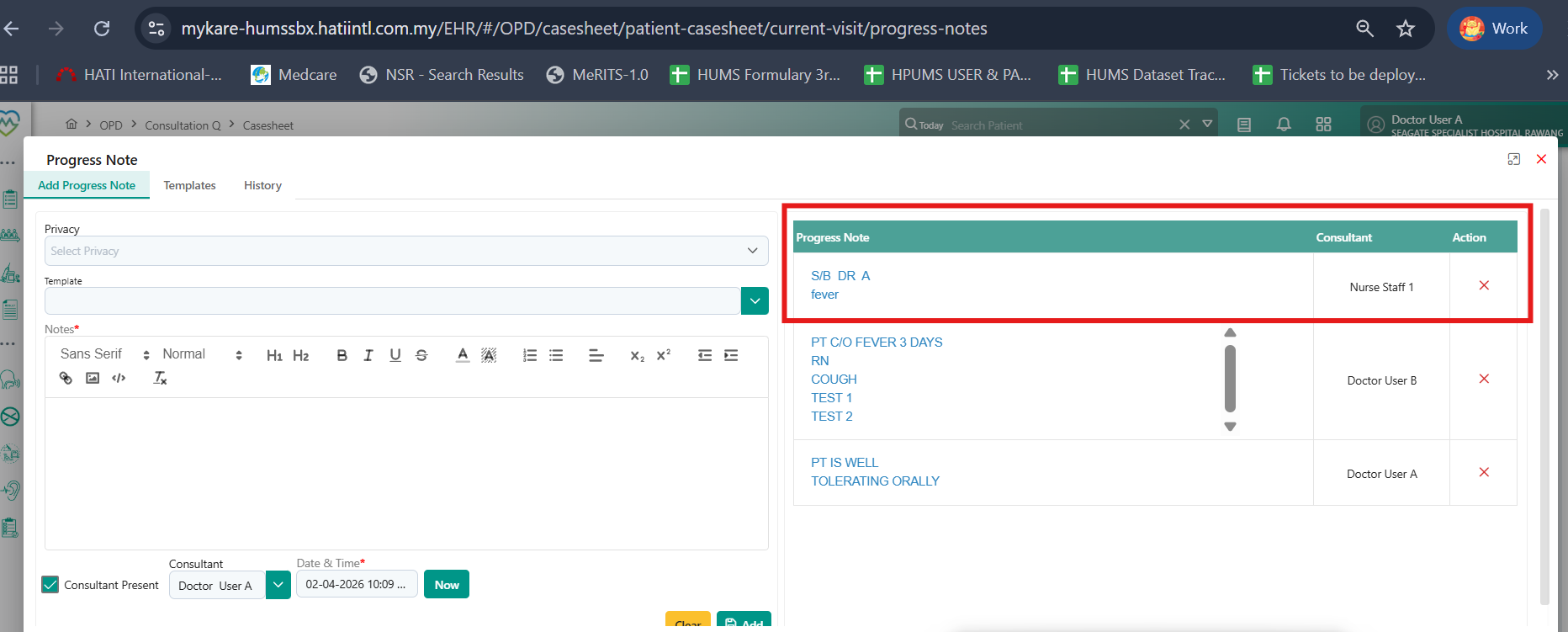
openClinicare > OP Nursing > Progress Note > Nurses log in are able to enter notes on DR's progress. Nurses should only have read-only access to Progress Note. Unable to configure on OP Consult settings.note.
0%
Description
Nurse able to add in progress note (doctor's progress note) where as nurse note exist in section.
Files
Updated by Daniyal Ansari 7 months ago
- Assignee changed from Daniyal Ansari to Amirali Mahjour
Updated by Kierthini Nethi 7 months ago
- Priority changed from High to Critical
- Function HUMS added
Updated by Kierthini Nethi 7 months ago
- Tracker changed from Task to Bug
- Severity set to Critical
- Function deleted (
HUMS)
Updated by Kierthini Nethi 7 months ago
- Category changed from M OPD to CliniCare
Updated by Kierthini Nethi 7 months ago · Edited
- Subject changed from OPD progress note entry to Clinicare > OP Nursing > Progress Note > Nurses log in are able to enter notes on DR's progress. Nurses should only have read-only access to Progress Note. Unable to configure on OP Consult settings.note.
NAVIGATION
USER MANAGEMENT > OP NURSING ACCESS RIGHTS
Description:
The initial issue was due to configuration being applied only to the OP Nurse role. Upon further review:
Login 1081 is assigned the ED Nurse role
Login 1082 is assigned the Nurse role
Both roles have now been updated with identical permissions (as per the referenced configuration/screenshot), and the Save button has been removed from Progress Notes for both roles.
Issue:
Despite the Save button being removed, users are still able to save data via the draft functionality. This behavior bypasses the intended restriction and allows data persistence.
Expected Behavior:
When the Save button is disabled/removed based on role permissions, users should not be able to save Progress Notes in any form, including via draft functionality.
Actual Behavior:
Data continues to be saved through the draft mechanism even when the Save option is not available.
Impact:
This creates a permissions loophole where users can still store data despite restricted access controls.
Action Required:
Kindly investigate and restrict the draft functionality in alignment with role-based permissions to prevent unintended data saving.
Updated by Amirali Mahjour 4 months ago
No code change needed for this one. It's an access-rights setting.
Examination Note is already marked read-only for the nurse role, Progress Note isn't. That's the whole difference. Both components go through the same permission check in the casesheet, so setting it gives us the same behaviour.
How to set it:
Go to Users > Access Rights > OP Nursing Access Right. Pick the nurse role in the dropdown at the top, then scroll to the "Examination (Objective)" section and find the Progress Note row. Leave "Has Access" ticked so nurses can still read existing notes, and tick "Is Read only". Save. Compare the row with Examination Note in the same section, they should look the same now. Repeat for any other nurse roles.
After saving, log in as a nurse and check both the OP nursing casesheet and the ER casesheet. The Progress Note card should still list the existing notes but the "+" button should be gone. Also check as a doctor that the "+" is still there.
If the "+" is still showing for the nurse after saving, check the role identifier stored in the config against the one in the user's profile, they need to match exactly or the check silently passes.
Updated by Marcella David Kok 4 months ago
- File user management_privilieges_op nursing access rights_.png user management_privilieges_op nursing access rights_.png added
- File op nursing_progress note_view only.png op nursing_progress note_view only.png added
- File op doctor_op consult_progress note_.png op doctor_op consult_progress note_.png added
- File ADMIN_OP NURSING.png ADMIN_OP NURSING.png added
- File ADMIN_USER MANAGER.png ADMIN_USER MANAGER.png added
- File ADMIN_PRIVILEGES_OP NURSING ACCESS RIGHTS.png ADMIN_PRIVILEGES_OP NURSING ACCESS RIGHTS.png added
- File ADMIN_MANAGE NURSE_S ROLE.png ADMIN_MANAGE NURSE_S ROLE.png added
- File ADMIN_EXAMINATION_PROGRESS NOTE_HAS ACCESS_READ ONLY.png ADMIN_EXAMINATION_PROGRESS NOTE_HAS ACCESS_READ ONLY.png added
- Status changed from Coded to Tested
Action done:
LOG IN AS ADMIN USER> 9 DOTS> CLINICAL OP NURSING> USER MANAGEMENT> PRIVILEGES> OP NURSING ACCESS RIGHTS> SELECT NURSE ROLES> EXAMINATION> PROGRESS NOTE> SELECT HAS ACCESS & READ ONLY
IMAGE 1
LOG IN AS ADMIN USER> 9 DOTS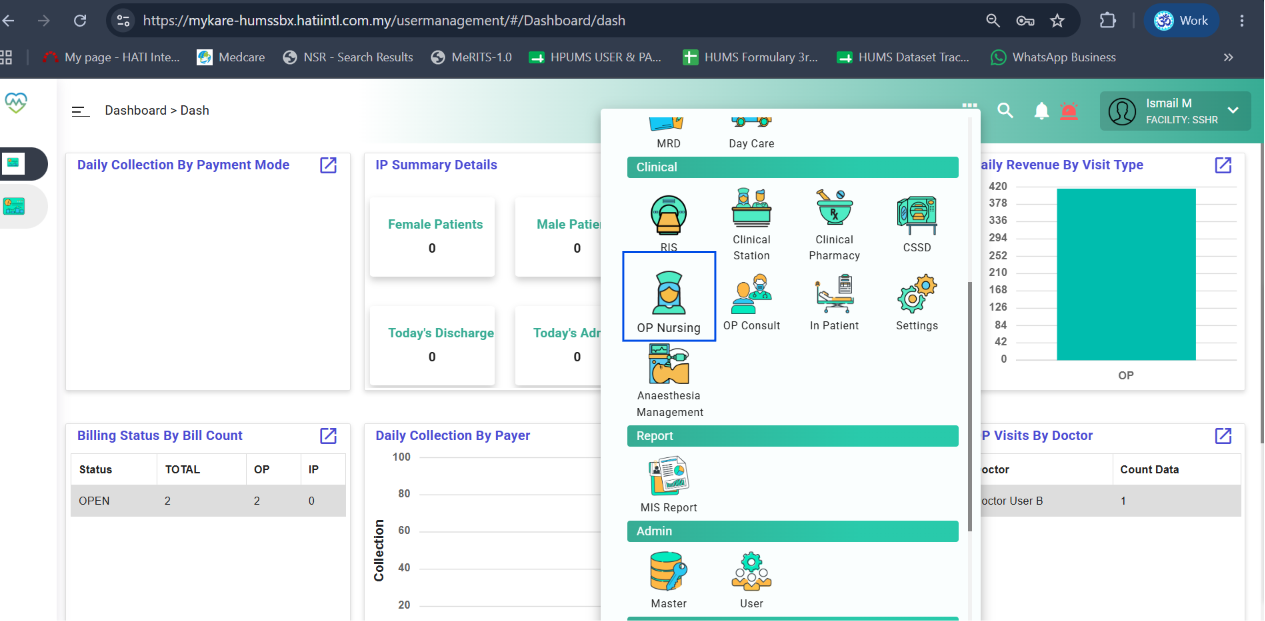
IMAGE 2
CLINICAL OP NURSING> USER MANAGEMENT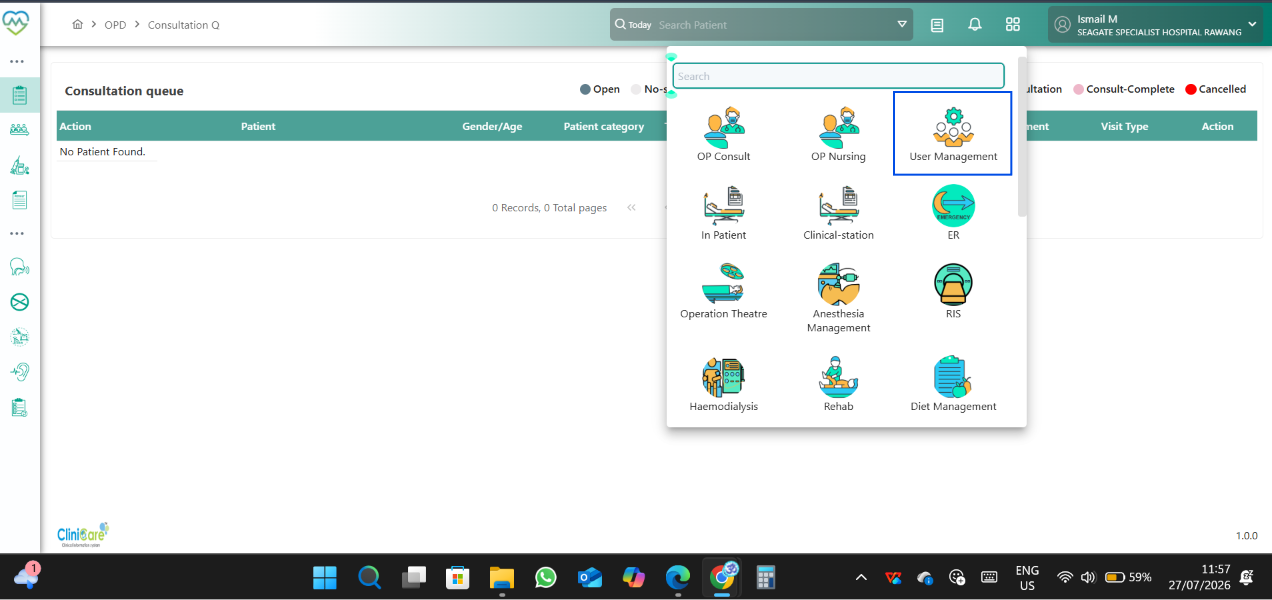
IMAGE 3
PRIVILEGES> OP NURSING ACCESS RIGHTS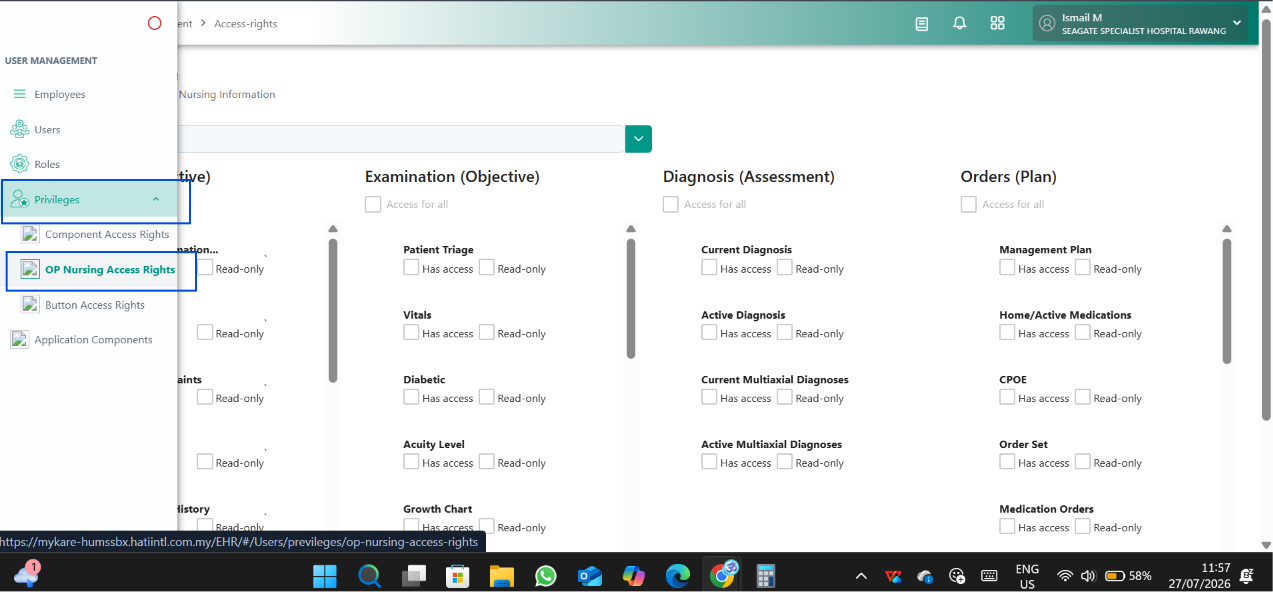
IMAGE 4
SELECT NURSE ROLES 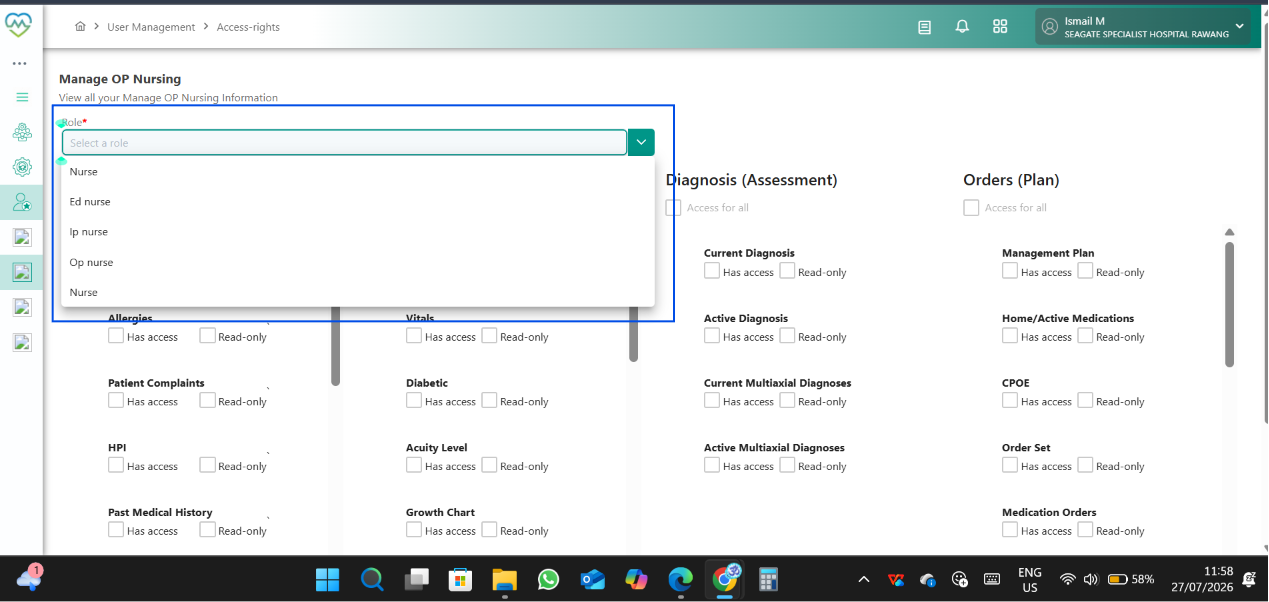
IMAGE 5
EXAMINATION> PROGRESS NOTE> SELECT HAS ACCESS & READ ONLY (NURSE IN GENERAL)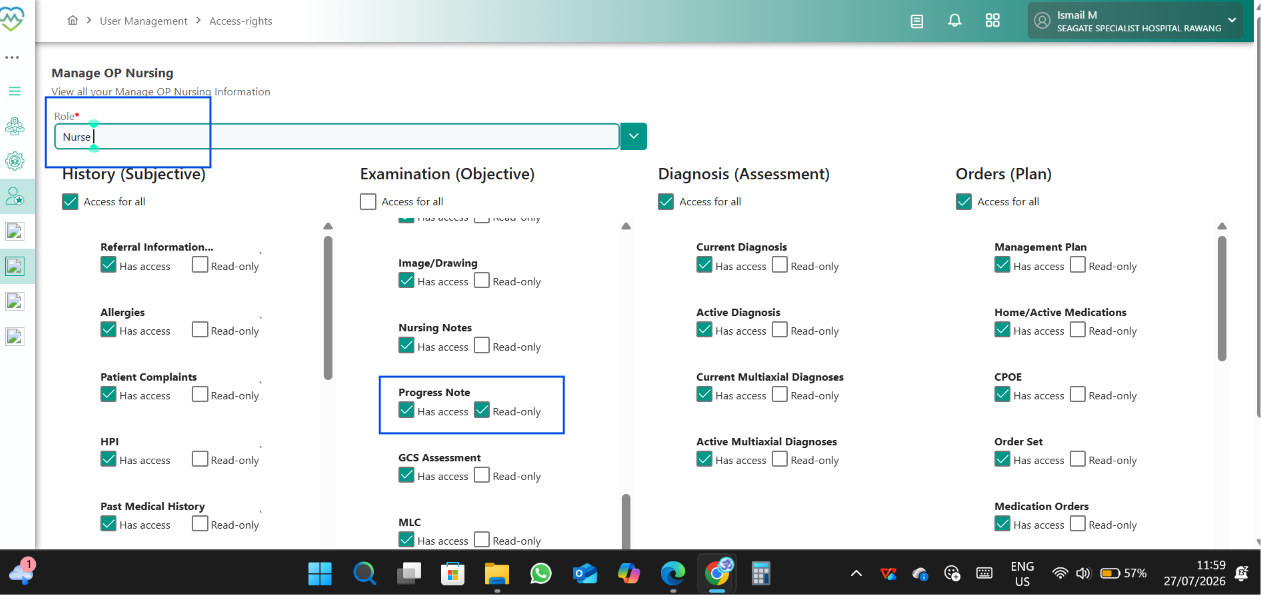
IMAGE 6
EXAMINATION> PROGRESS NOTE> SELECT HAS ACCESS & READ ONLY (OP NURSE)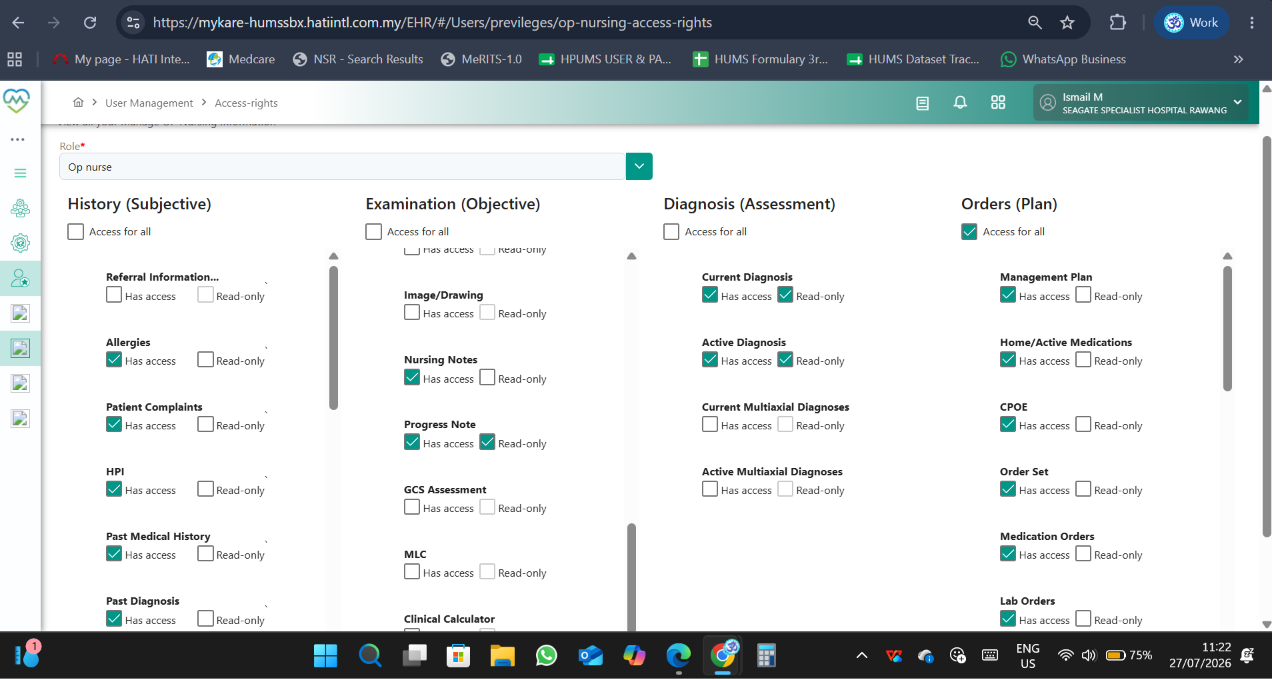
IMAGE 7
AFTER ACCESS CHANGED, NURSE ONLY ABLE TO VIEW DOCTOR'S PROGRESS NOTE IN OP NURSING MODULE.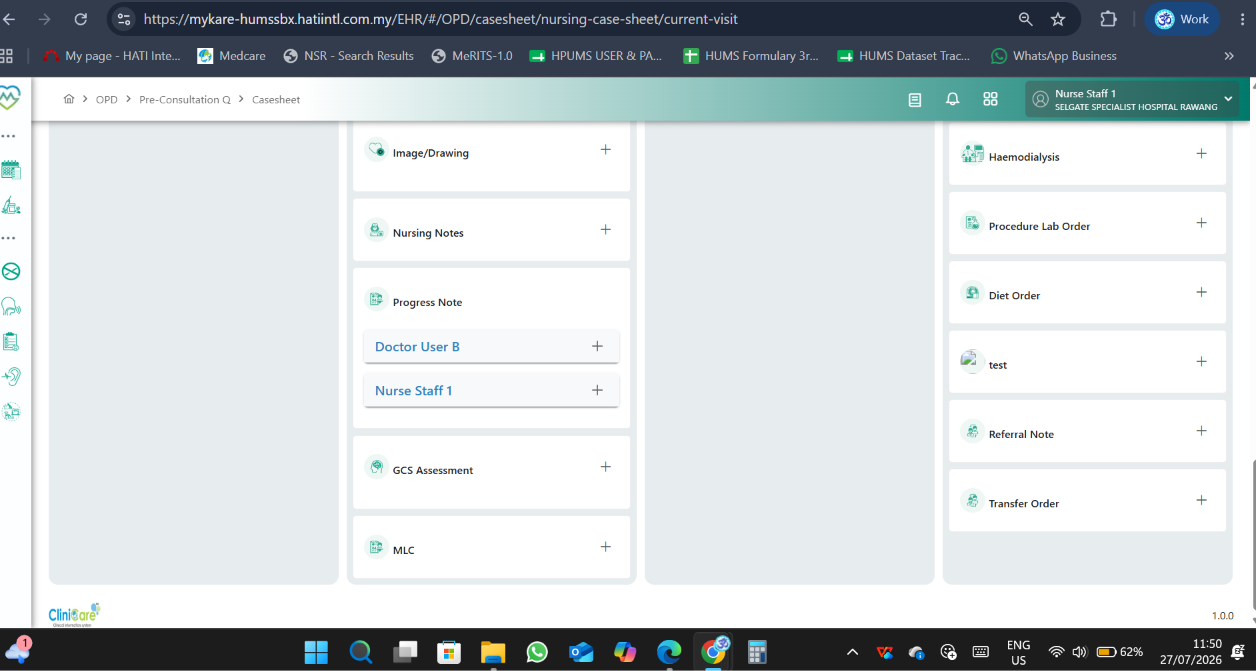
IMAGE 8
OP DOCTOR ACCESS TO ADD NOTES REMAINS ACTIVE.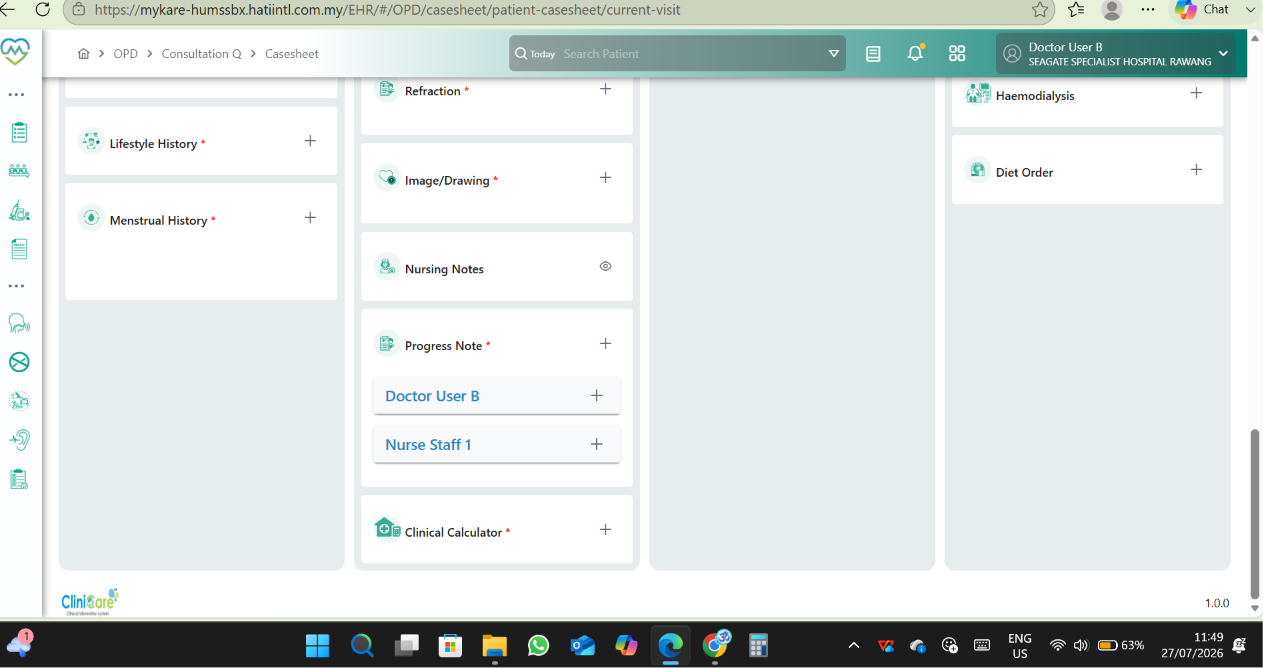
RESULTS TESTING SANDBOX: PASS
*After changes of OP nursing access right to read-only, op nurse is only able to read the doctor's progress note. Meanwhile, the OP doctor access to add in notes remain active.
*