Bug #93656
openCLINICARE> ER/OP> Secondary Survey>HPI >Update> unable to update or edit the HPI field.
0%
Description
1) In Secondary Survey > HPI Update, users are unable to update or edit the HPI (History of Present Illness) field.
The section appears but does not allow modification of existing entries.
2) Expected Functionality
The HPI field should allow:
Editing/Updating existing text entries.
Remarks/Notes to capture the reason for the update IN [UPDATED BY & UPDATED ON]
ER IMAGE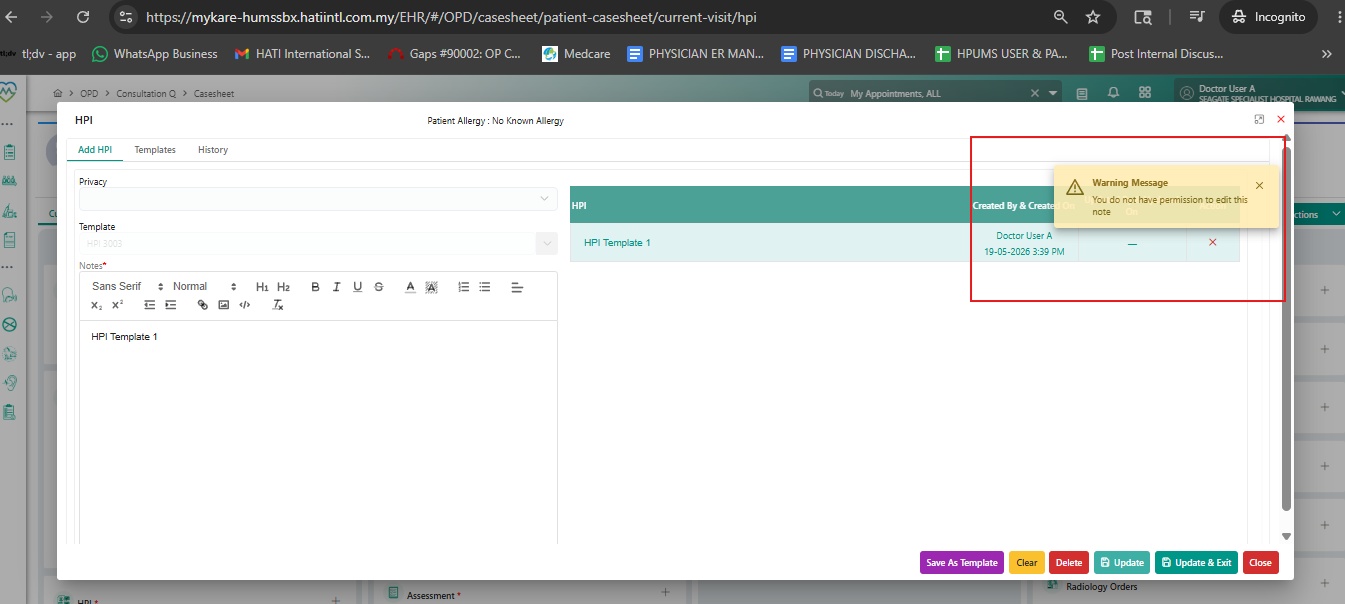
OP IMAGE
Files
Updated by Marcella David Kok 6 months ago
- Tracker changed from Goal to Bug
- Subject changed from CLINICARE> ER/OP> Secondary Survey>HPI >Update to CLINICARE> ER/OP> Secondary Survey>HPI >Update> unable to update or edit the HPI field.
- Status changed from Closed to New
- Severity set to Minor
- Bug/Defect On QA added
- Issue released on Dev added
Updated by Marcella David Kok 5 months ago
2ND iSSUE:
*Update Button Disappears
1. The Update and Update & Exit buttons are not visible when editing HPI entries.
2. Users only see the Save option, which creates confusion about whether they are updating or creating new entries.
Navigation Required to Enable Update
1. Users must navigate out of HPI (e.g., to Vitals/History) and then return before the system allows saving an update.
2. This workaround is inefficient and risks incomplete documentation.
Delete Reason & Delete Remark Not Functional
1. Both fields are present, but no entries can be made.
2. Users cannot input a reason, and deletion cannot be saved.
3. Current design blocks compliance since audit trail requires a valid reason.
EXPECTATION:
1. Update buttons should remain visible and functional.
2. Users should be able to update and save entries without navigation directly.