Bug #87640
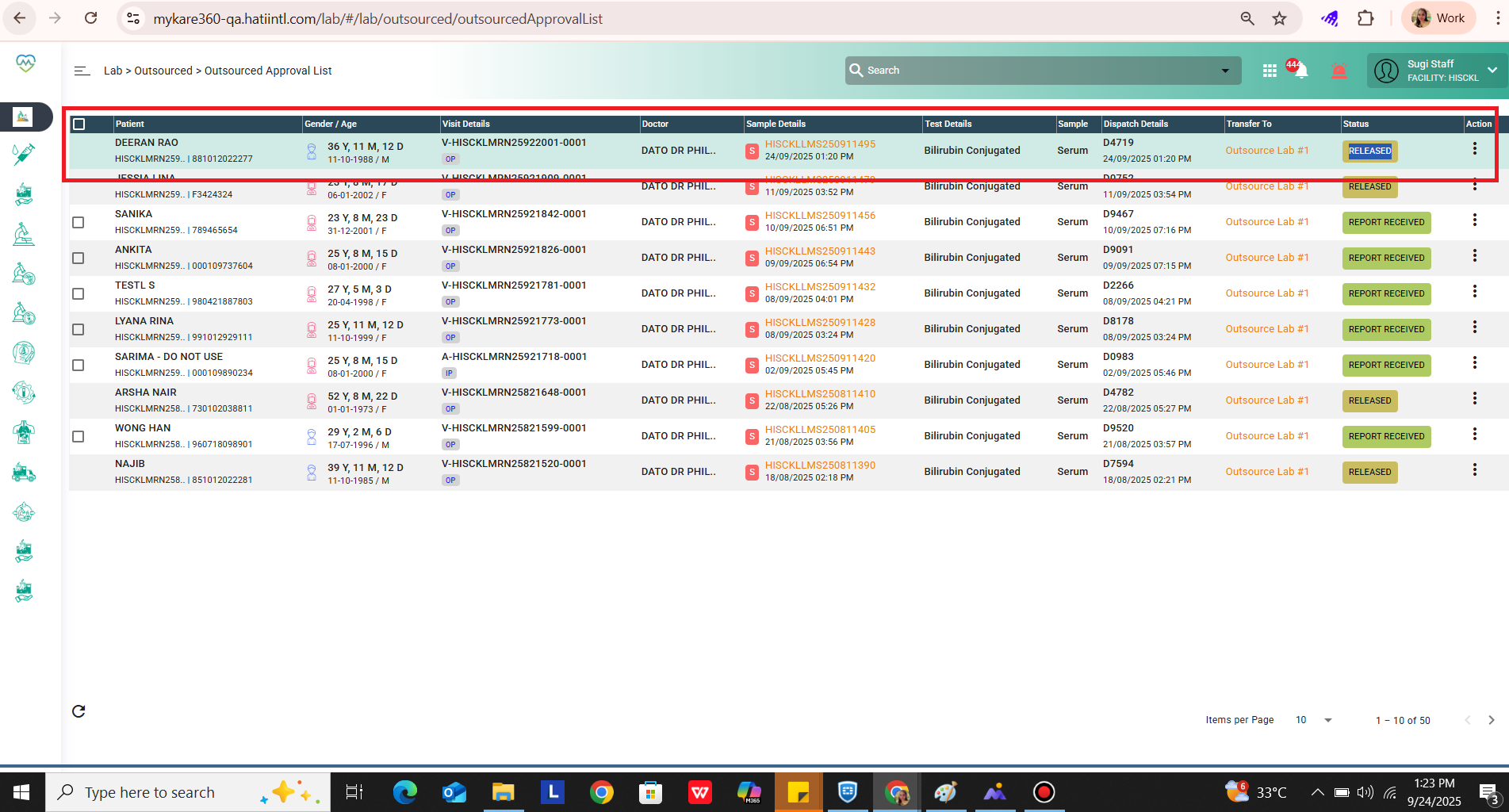
openOutsource Approval List > System allowing to modify or upload document once status change to Released
Description
Outsource Approval List > System allowing to modify or upload document once status change to Released
Steps to follow:
1. Go to outsource approval list
2. select the checkbox
3. view document
4. click save
5. status change to released
6. now again the checkbox is enabled to upload and save
Expected: Once status changed to Released, checkbox should disabled and not allow to do any transaction
video attacched
Files
Updated by Snehal Bhosale about 1 year ago
- Assignee changed from Prashant Isapure to Snehal Bhosale
Updated by Mohsin Ali about 1 year ago
- Assignee changed from Snehal Bhosale to Rupali Suryawanshi
Updated by Rupali Suryawanshi about 1 year ago
- File bandicam 2025-08-19 23-48-31-311.mp4 bandicam 2025-08-19 23-48-31-311.mp4 added
- Status changed from New to Coded
Updated by Shital pravin about 1 year ago
- Assignee changed from Rupali Suryawanshi to Mangesh Pangrekar
Updated by sugi vithyashini about 1 year ago
- File released.png released.png added
- File bandicam 2025-09-24 13-23-37-494.mp4 bandicam 2025-09-24 13-23-37-494.mp4 added
- Status changed from QA to Tested
- Assignee changed from Mangesh Pangrekar to Sunil Shinde
Issue resolved in QA
Updated by Mangesh Pangrekar 6 months ago
- Assignee changed from Sunil Shinde to Kierthini Nethi
Updated by Kierthini Nethi 6 months ago
- Assignee changed from Kierthini Nethi to Vasuki Muniratnam
- Issue released on NA added
Updated by Nurfarisha Izani 4 months ago
- File clipboard-202607221537-kzm3b.png clipboard-202607221537-kzm3b.png added
- File Screen Recording 2026-07-22 153454.mp4 Screen Recording 2026-07-22 153454.mp4 added
- Status changed from Tested to Re-open
- Assignee changed from Nurfarisha Izani to Daniyal Ansari
Update from Farisha: VVVVVVVVVVVV
Environment: QA
Issue: Skipping flow.
Description: The report of the test was edited before approval however when the new document uploaded, the status become 'release' which is skipping the approval flow.
Step to reproduce:
1. Order the lab test for outsources
2. Accept in the Sample taking
3. Go to Outsource > Outsource. Select your patient and choose transfer to dropdown and click transfer button.
4. A pop-up will appear and click save button
5. Navigate to outsourced list and select the patient and click 3 dots and upload necessary document and click save.
6. Observe if the test is appeared in the outsourced approval list screen with 'report received' status.
7. navigate back to outsourced screen and click outsource list tab.
8. click the 3 dot and click upload document. delete the current document. a pop-up will appear as security, enter the user passcode.
9. upload the new document and save
10. observe again the test in the outsourced approval list. the test already become released without approval.
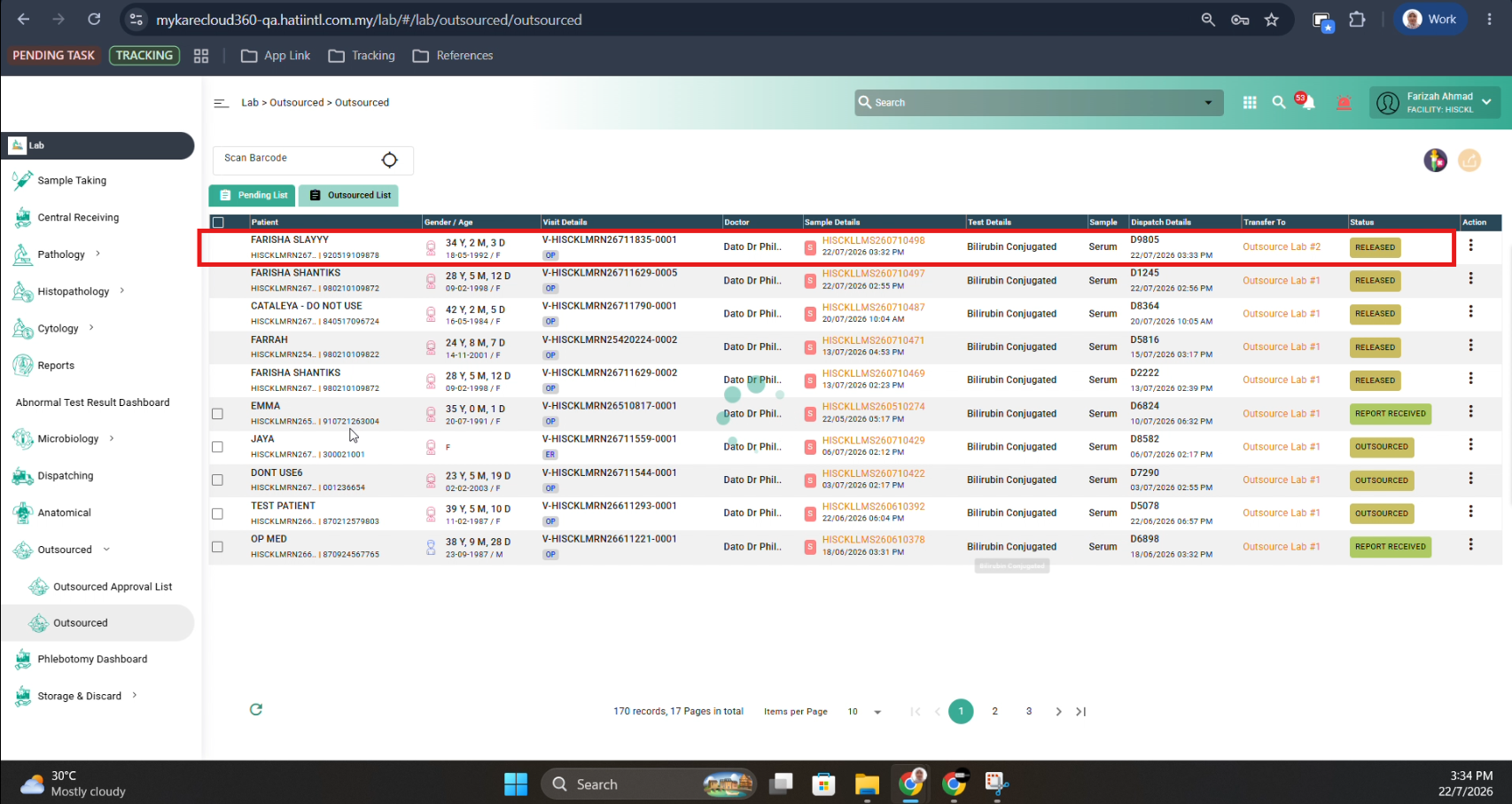
Expected Result:
1. Eventhough the new report is uploaded during the test was in outsourced list, the status should become report received
2. user able to approved the updated document
3. User able to update the document when the status of the test is released in the outsourced approval list
Result: Re-open
Updated by Daniyal Ansari 3 months ago
- Assignee changed from Daniyal Ansari to Rupali Suryawanshi
Updated by Rupali Suryawanshi 3 months ago
- Status changed from Re-open to Coded
Updated by Jayadeep kasukurthi 3 months ago
- Assignee changed from Rupali Suryawanshi to Mangesh Pangrekar