Bug #93882
openSample Search Result Lost After Using Reset Screen Function
0%
Description
Path:
1. Lab > Serology > Sample Processing > Scan Barcode
2. Pathology> Result entry > scan barcode
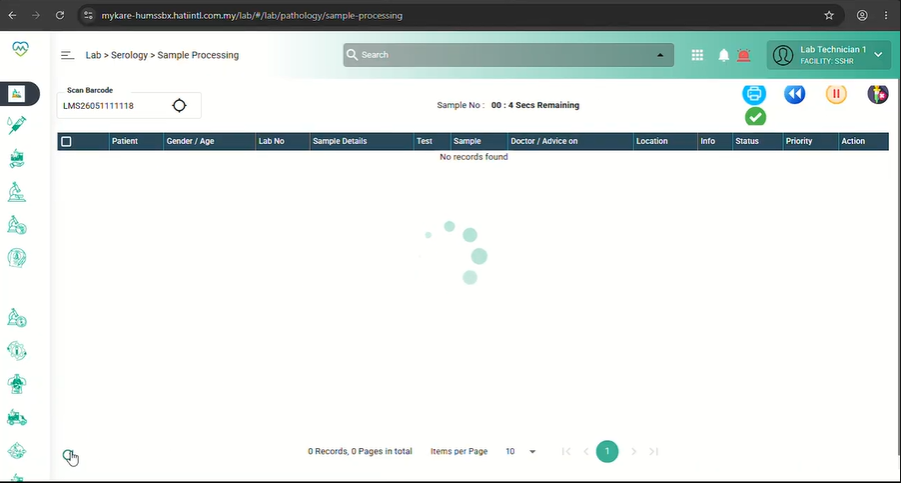
Issue: Able to search using the sample number manually, but the search result is only retained until the screen timer resets. When the Reset Screen option is used to reset the screen immediately, the searched result is not displayed.
Expected Behavior:
The manually searched sample number should display the correct result regardless of whether the screen timer has expired or the Refresh Screen option is used.
Steps to Reproduce:
1. Copy one of the sample no
2. Paste the sample no at the scan barcode area the click enter. The sample will appear in the table.
3. Then click the refresh button, observe that no result is displayed after the screen reset
Files
Updated by Nurfarisha Izani 5 months ago
- Description updated (diff)
- Assignee changed from Vasuki Muniratnam to Daniyal Ansari
Updated by Nurfarisha Izani 5 months ago
- File error 27.mp4 error 27.mp4 added
- Description updated (diff)
Updated by Daniyal Ansari 5 months ago
- Description updated (diff)
- Assignee changed from Daniyal Ansari to Nurfarisha Izani
Hi @Nurfarisha, the functionality of the refresh button is to reset the filters and reload the default data. If functionality is working accordingly to that, then this is not a bug, can you check and reconfirm, thank you.