Bug #94112
openPatient Consumption > Status Not Updated to “Closed” After Pharmacist Approval for Patient Consumption Order
0%
Description
Issue Description:
After a pharmacist approves the order for patient consumption, the system status does not automatically update to “Closed”. The status remains unchanged, causing inconsistency in the workflow and making it difficult to track completed orders.
Step to reproduce
1.Login System
2.Navigate to > Pharmacy
3.Click on Patient Consumption
4.Click on Doctor's Order
5.Observe screen > After a pharmacist approves the order for patient consumption, the system status does not automatically update to “Closed”
Expectation:
Once the pharmacist has successfully approved the order for patient consumption, the system should automatically update the status to “Closed” to reflect that the process is completed. This ensures accurate workflow tracking and prevents duplicate processing or confusion in order status management.
Picture 1: The doctor's order screen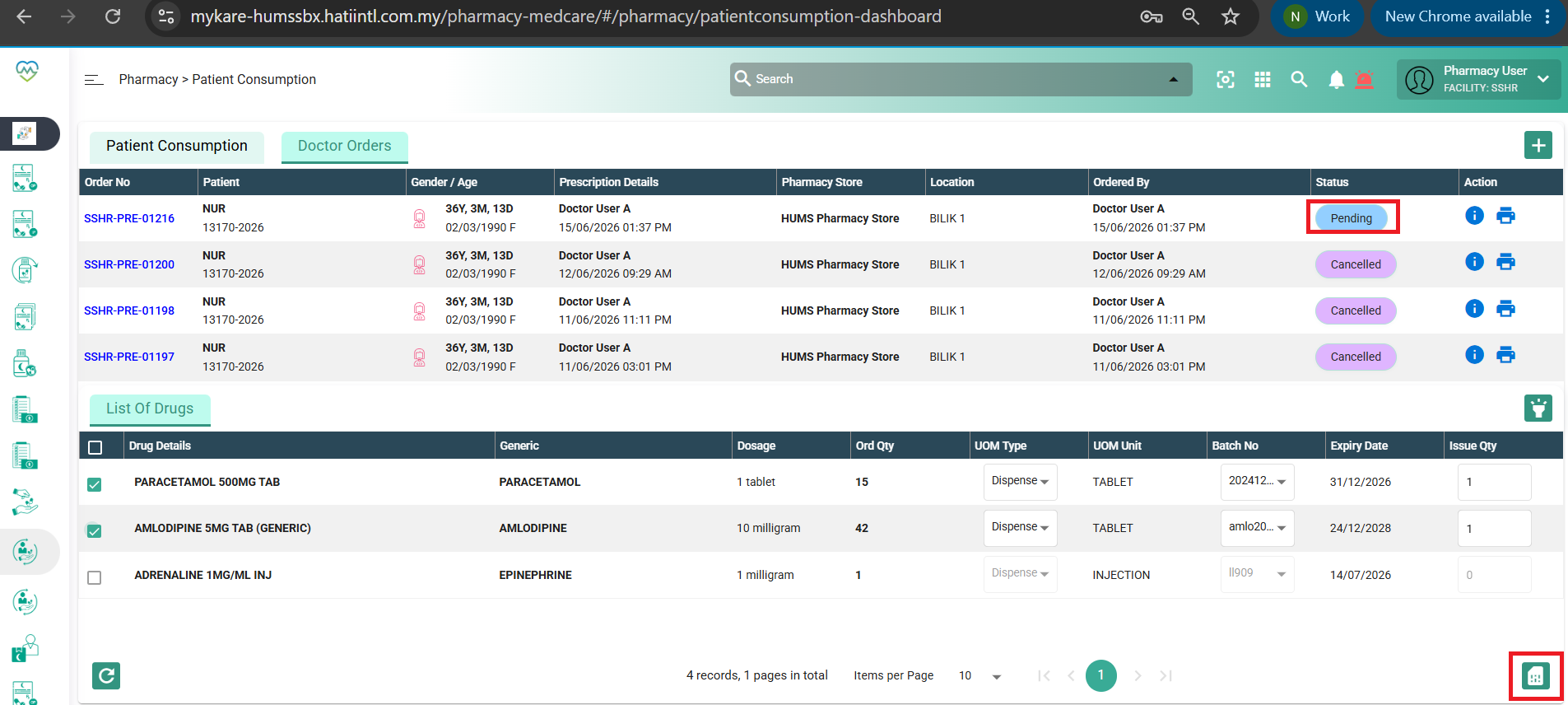
Files