Gaps #94265
openPharmacy > Patient Consumption > Doctor's Order. Issue Quantity Not Auto-Populated Based on Order Quantity in Patient Consumption
0%
Description
Issues Description : In Pharmacy > Patient Consumption > Doctor's Order, the Issue Quantity field is not automatically populated based on the Order Quantity prescribed by the doctor. Users are required to manually enter the Issue Quantity again, even when the issued quantity is the same as the ordered quantity. This creates unnecessary manual work and increases the risk of data entry errors.
Step to reproduce
1.Login System
2.Navigate to > Pharmacy
3.Click on Patient Consumption
4.Click on Doctor's Order
5.Observe screen > In Pharmacy > Patient Consumption > Doctor's Order, after selecting a doctor's order, the Issue Quantity field is left blank or requires manual input. Users need to re-enter the quantity even though the Order Quantity has already been specified in the doctor's order.
Expectation: The system should automatically populate the Issue Quantity field with the Order Quantity from the doctor's order by default
Picture 1: the doctor's order screen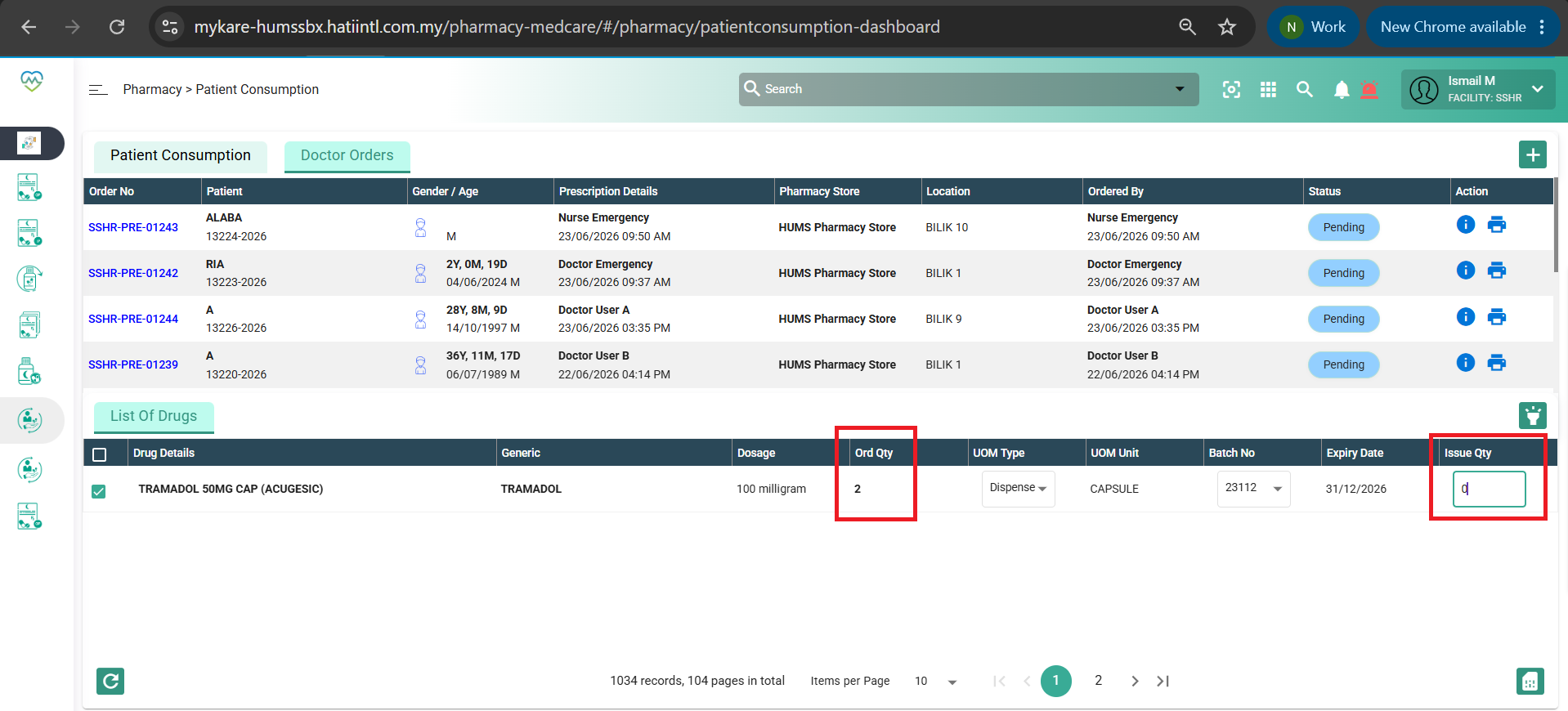
Files