Gaps #93456
openGaps #92948: STAT Medication In-Clinic Orders Incorrectly Flowing to Outpatient Pharmacy Instead of Floor Stock Deduction
PHIS >Patient Consumption > Doctor's Order Screen Enhancement - Add "STAT Dose Screening" Tab
0%
Description
Issue Description:
Currently, the Doctor's Order screen does not provide a dedicated tab for managing STAT Dose medication orders. This may affect workflow efficiency and delay the dispensing of medications that require immediate attention.
Proposed Enhancement:
Add the following tabs to the Doctor’s Order screen:
1. Screening
Expected Behavior:
Introduce a new "STAT DOSE" tab in the Doctor's Order screen. Same UI for medication OP/IP/ER
The STAT DOSE tab shall:
- Display only medication orders categorized as STAT Dose.
- Use the same UI layout and workflow as the Patient Medication Screening screen, including:
- Patient information section:
        i. Token
        ii. Prescription Details
        iii. Patient
        iv. Gender/Age
        v. Visit/Location
        vi. Priority
        vii. Vitals
        viii. Pharmacy Store
        ix. Status (Pending, Completed, Reject)
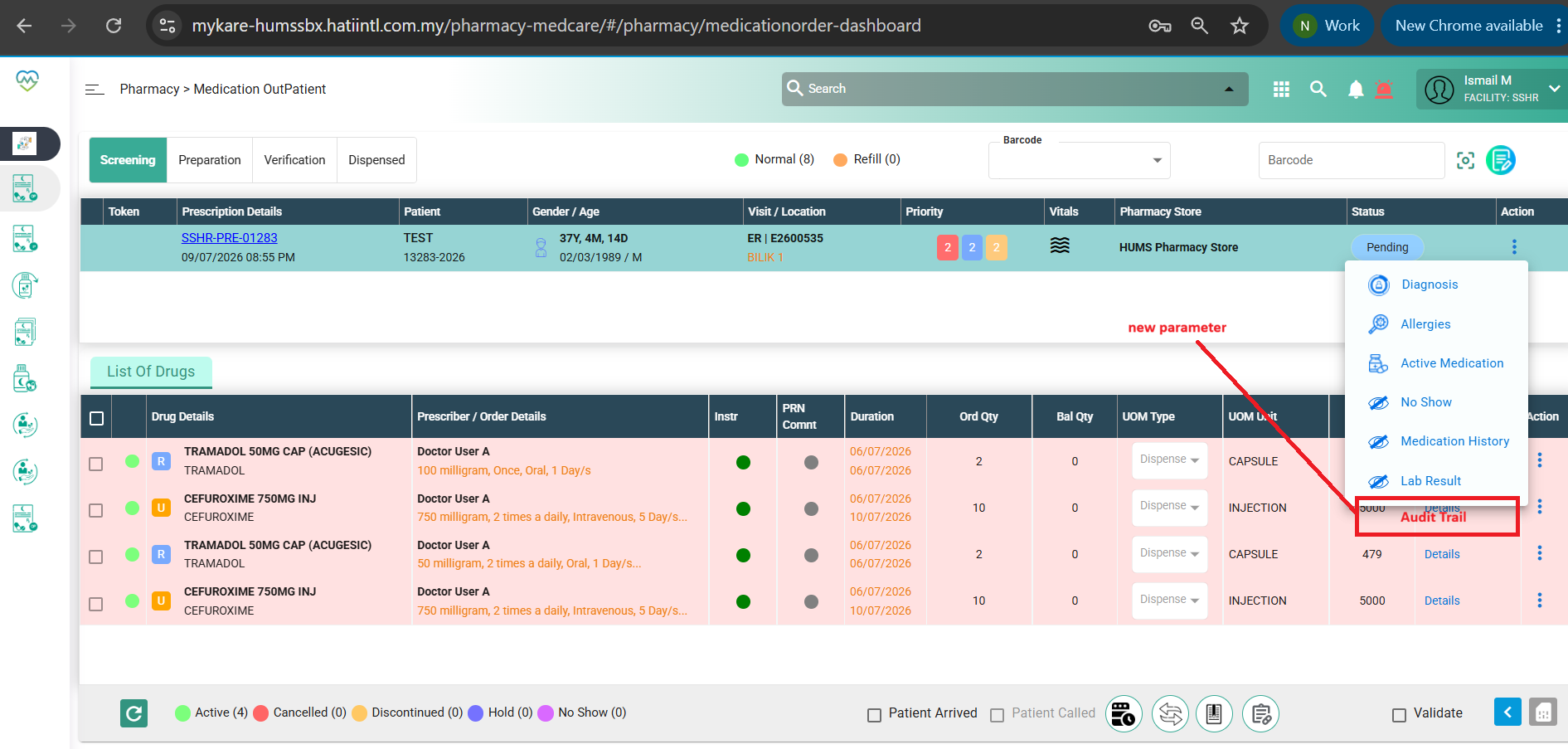
        x. Action (Diagnosis, Allergies, Active Medication, No Show, Medication History, Lab Result)
        xi. Audit Trail (Date & Time, Username, Action, Remarks)
- List of Drugs section with:
i. Drug Details
ii. Prescriber / Order Details
iii. Instruction Indicator
iv. PRN Indicator
v. Duration
vi. Ordered Quantity
vii. Balance Quantity
viii. UOM Type
ix. UOM Unit
x. Quantity on Hand (QOH)
xi. Counselling
xii. Action menu
- discontinue
- hold
- order status (Pending, Completed, Reject)
- add comment
- edit dosageAcceptance Criteria
- A new STAT DOSE tab is available on the Doctor's Order screen.
- Only medication orders categorized as STAT Dose are displayed in the STAT DOSE tab.
- The UI matches the existing Patient Medication Screening screen.
- A Timestamp is displayed for every STAT Dose order, showing the order creation/prescribed date and time according to the system's standard date and time format.
- All actions performed within the STAT DOSE tab are recorded in the Audit Trail, including the user, timestamp, action performed).
- Only users with the Pharmacy role are authorized to access and perform STAT DOSE Screening.
- Only users with the Nurse role are authorized to create and save Doctor's Orders.
Picture 1: Expected Doctor's Order UI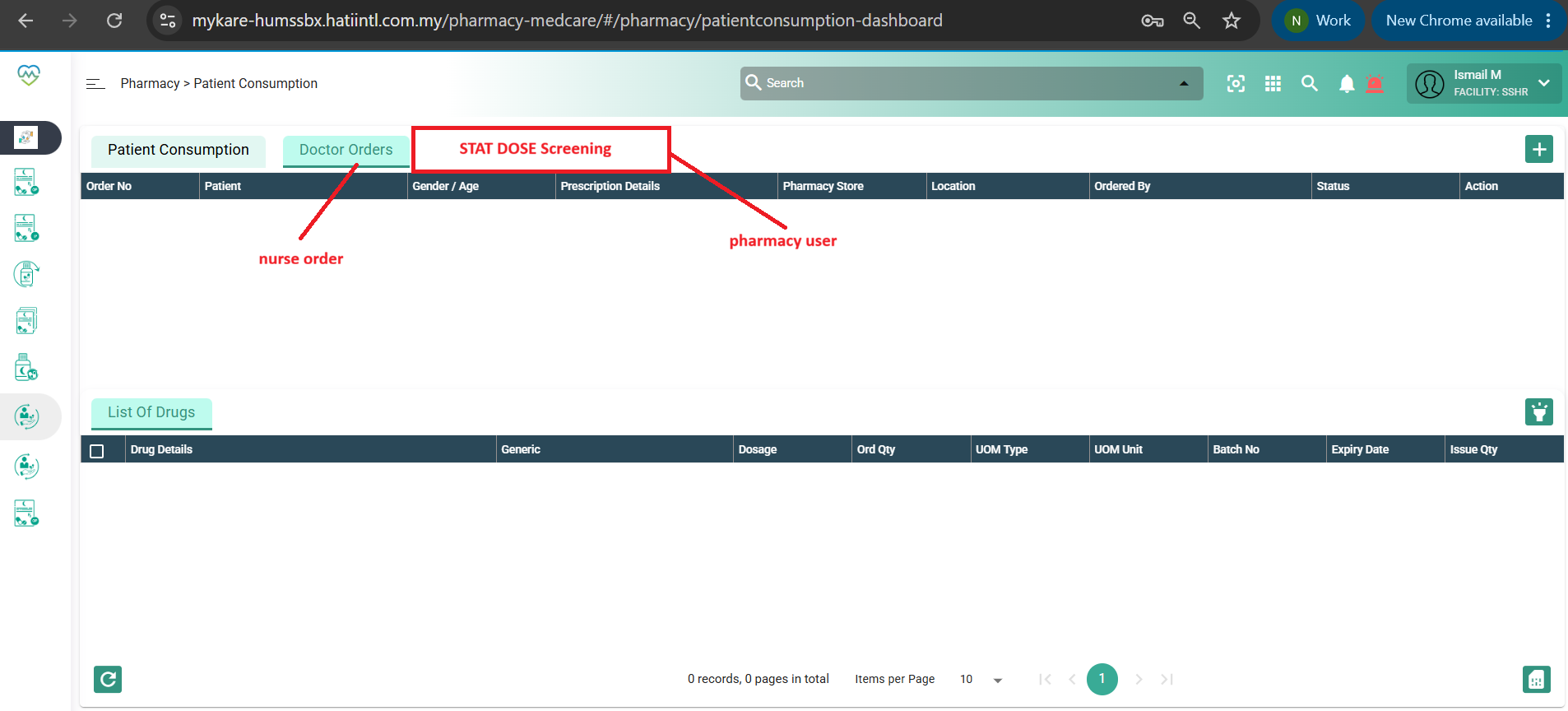
Picture 2 and Picture 3: To have similar UI with Screening tab in Doctor's order screen for STAT DOSE Screening.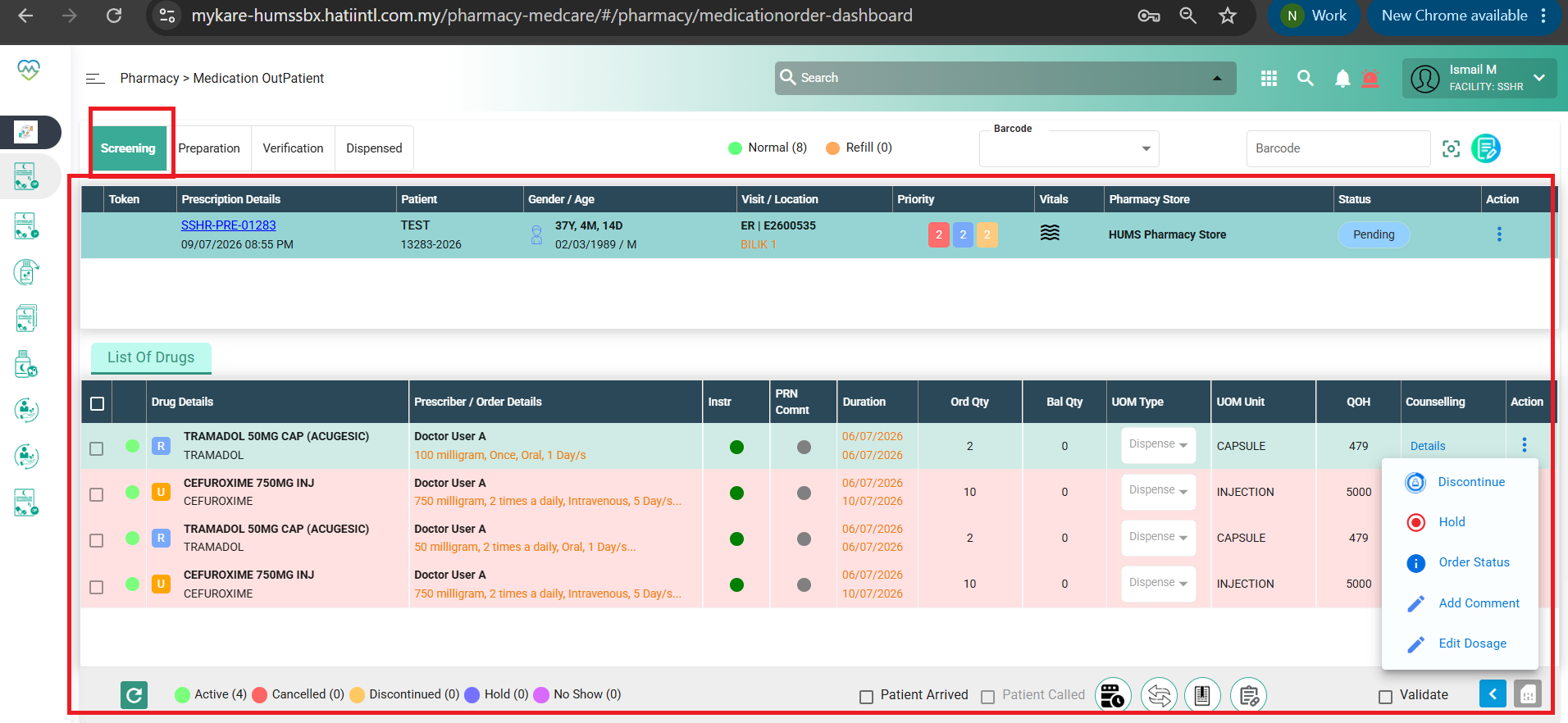
Files
Updated by Nur'Ain Binti Karim 4 months ago
- File clipboard-202607161410-mjnyi.png clipboard-202607161410-mjnyi.png added
- File clipboard-202607161410-agnf9.png clipboard-202607161410-agnf9.png added
- File clipboard-202607161413-yfxod.png clipboard-202607161413-yfxod.png added
- Subject changed from PHIS >Patient Consumption > Doctor's Order Screen Enhancement to PHIS >Patient Consumption > Doctor's Order Screen Enhancement - Add "STAT Dose Screening" Tab
- Description updated (diff)
Updated by Nur'Ain Binti Karim 4 months ago
- File deleted (
clipboard-202605141620-z5pyh.png)
Updated by Nur'Ain Binti Karim 4 months ago
- File deleted (
clipboard-202605141620-3vmvn.png)
Updated by Daniyal Ansari 4 months ago
- Assignee changed from Daniyal Ansari to Shweta Sandip Waghmare
- Dev Due date set to 10/08/2026
- Release date to QA set to 10/08/2026
Updated by Daniyal Ansari 2 months ago
- Assignee changed from Shweta Sandip Waghmare to Daniyal Ansari